The Next-Gen Helpdesk in Slack Powered by AI Agents Review

The Next-Gen Helpdesk in Slack Powered by AI Agents Review
Most helpdesk tools ask your team to leave the conversation to manage the ticket. This category of product flips that: the ticket, the triage, and the AI agent all live inside Slack. This review looks at what the next-gen Slack-native helpdesk actually does well, where it strains, who should buy it, and how to decide between it and the alternatives.
What this product is
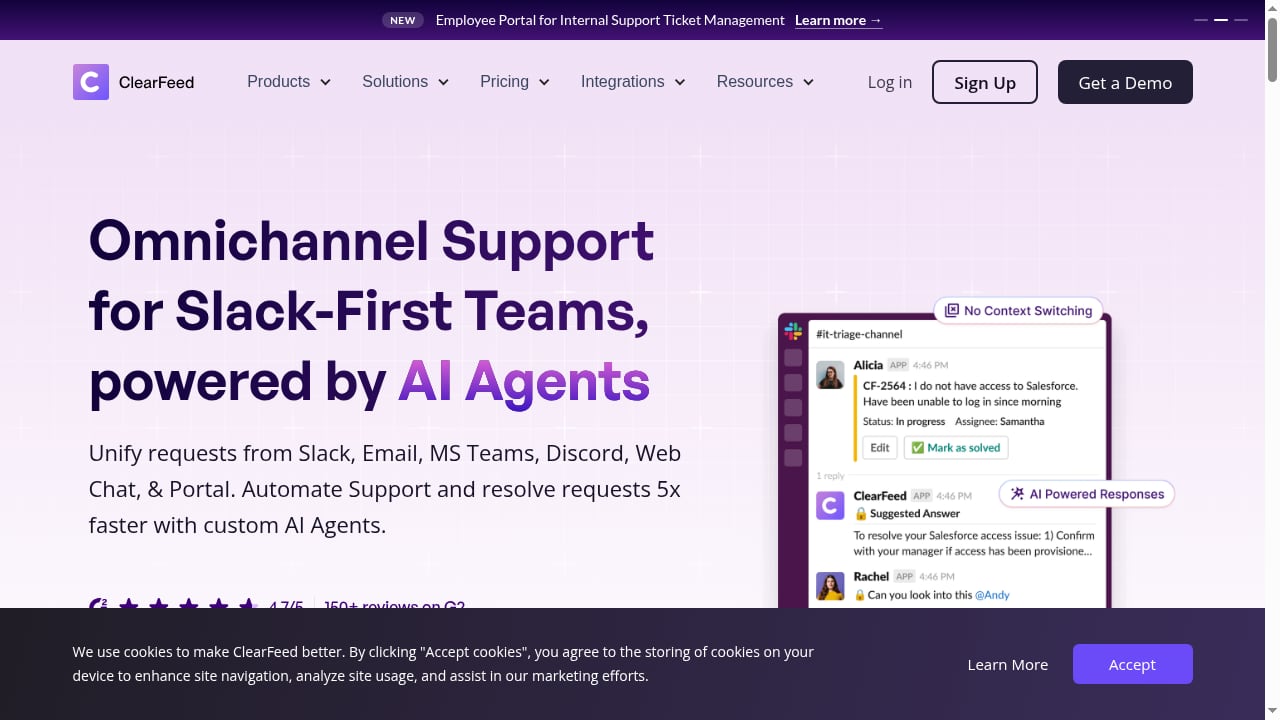
First viewport screenshot of The Next-Gen Helpdesk in Slack Powered by AI Agents.
The next-gen helpdesk in Slack is an AI-native support platform built for teams that already run on Slack. It combines three layers:
- Omnichannel intake — requests arrive from Slack, email, Microsoft Teams, Discord, web chat, and a customer portal, then land in one workflow.
- Ticketing and triage — tickets are created manually or automatically in channels, routed to private triage channels, and tracked through states and ownership.
- AI agents — custom agents connect to your tools and knowledge sources to answer questions, suggest replies, and resolve requests faster than a human queue alone.
The pitch is a minimal learning curve. Instead of teaching your team a new portal, the product meets them in the Slack channels and DMs they already use.
Who it is for
This is not a universal helpdesk. It fits specific operating models far better than others.
Strong fit
- Internal IT and HR service desks where employees already raise issues in Slack channels and DMs. The product's own customer stories describe reduced DMs and cleaner request routing for culture, talent, and engineering teams.
- B2B SaaS support teams that run shared Slack channels with customers and want ticket state, ownership, and AI answers without leaving those channels.
- Engineering-adjacent support where tickets need to sync to Jira, Linear, ClickUp, Asana, or GitHub while the conversation stays in Slack.
Weak fit
- Teams with no Slack adoption. The entire value proposition collapses if your users live in email or a portal.
- Highly regulated support workflows that require deep audit trails, custom data residency, or self-hosted deployment. A Slack-native tool is not the first place to look.
- Very large contact-center operations with workforce management, IVR, and voice routing needs. Those are contact-center platforms, not Slack helpdesks.
Core use cases
First viewport screenshot of How to Update Freshdesk Tickets Directly in Slack.
1. Employee support in Slack
An employee posts a request in a help channel. The platform creates a ticket, applies AI-generated fields, routes it to the right triage channel, and lets an agent resolve it with an internal note marked with a lock emoji. Approval workflows can trigger on ticket creation and be approved or rejected directly in Slack.
2. Customer support from shared channels
For B2B teams, a customer message in a shared channel becomes a trackable ticket with SLA alerts and reminders. Replies can go back to the customer while internal collaboration stays private.
3. AI-assisted resolution
Custom AI agents connect to knowledge sources such as Google Drive, Notion, Confluence, and websites. The vendor claims 100+ knowledge sources and GPT-4 with vector search, versus keyword-only matching in some competitors. In practice, this is the feature to test hardest — AI answer quality depends entirely on how clean your knowledge base is.
4. Ticket sync with engineering tools
Tickets can create Jira tasks with AI-assisted summarization, and two-way sync keeps status aligned. This matters when support and engineering share a backlog but not a tool.
Strengths
- Slack-native by design, not by integration. Ticket actions — create, update, close, collaborate — happen in Slack rather than being mirrored from an external portal. That is a meaningful difference from tools that only send Slack notifications.
- Low learning curve. The vendor's core claim is zero-friction setup and minimal configuration. For teams already fluent in Slack, that is realistic.
- Broad intake. Slack, email, Teams, Discord, web chat, and portal coverage means you are not forcing every requester into one channel.
- AI across the ticket lifecycle. AI fields, state transitions, agent assistance, and Jira summarization are applied at multiple points, not just in a chat widget.
- Transparent pricing signals. The vendor advertises simple, transparent pricing with a 14-day free trial and no credit card required, plus both agent-based and user-based pricing options.
- Strong review signal. The product advertises a 4.7/5 rating with 150+ G2 reviews on its homepage and 100+ on its comparison page — worth verifying directly on G2 before you buy.
Limitations and trade-offs
- Slack dependency is a single point of failure. If Slack has an outage or your workspace policies restrict apps, your helpdesk goes with it.
- AI quality is knowledge-base dependent. Vector search over messy documentation produces confident wrong answers. Budget time for content cleanup.
- Review counts vary by page. The homepage cites 150+ reviews while the comparison page cites 100+. That is a minor inconsistency, but it is a reminder to check third-party review sites rather than marketing copy.
- Not a full CCaaS. No voice routing, workforce management, or deep contact-center telephony. Teams needing those should compare against contact-center platforms.
- Portal experience is secondary. If your customers expect a polished self-service portal, a Slack-first tool may feel thin.
Pricing signals
Pricing is not published as a fixed public tier in the material reviewed. What is visible:
- A 14-day free trial with no credit card required.
- Flexible pricing with both agent-based and user-based options — useful if only a subset of your Slack users need agent seats.
- A positioning claim of simple, transparent pricing, which usually means per-seat tiers rather than usage-based AI metering.
Treat these as signals, not quotes. Ask the vendor directly about: AI resolution limits, knowledge source caps, per-user versus per-agent billing, and what happens to ticket history if you downgrade.
Setup and onboarding
The vendor's claim is that you can get started in minutes with no complex configuration. Realistically, expect this sequence:
- Install the Slack app and authorize it for the relevant channels.
- Choose intake channels and decide which become triage channels.
- Connect knowledge sources — Google Drive, Notion, Confluence, or your website.
- Configure AI fields and routing rules so tickets land with the right owner.
- Connect downstream tools such as Jira, ClickUp, Linear, Asana, or GitHub for two-way sync.
- Set SLA alerts, CSAT surveys, and out-of-office automations.
Steps 1–3 are fast. Steps 4–6 are where the real configuration effort lives, and where a trial should be spent.
How it compares
First viewport screenshot of Introducing DocAssist in ClearFeed: An AI Agent for Automatically Updating Documentation & KBs from Support Conversations.
| Dimension | Slack-native AI helpdesk | Traditional helpdesk (e.g., Jira Service Management) | CCaaS platform |
|---|---|---|---|
| Primary surface | Slack channels and DMs | External portal | Agent desktop and telephony |
| Learning curve | Low for Slack users | Steep for non-technical teams | Moderate to steep |
| AI resolution | Custom agents over 100+ knowledge sources | Limited, often keyword-based | Varies by vendor |
| Ticket sync | Two-way with Jira, ClickUp, Linear, Asana, GitHub | Native to its own ecosystem | Usually via integrations |
| Best for | Slack-first internal and B2B support | Enterprise IT with portal workflows | Large contact centers |
For a broader view of how AI support platforms stack up on AI agents, channels, and pricing, see this comparison of Intercom vs Genesys Cloud CX vs CM.com. If your team is weighing AI live chat options more generally, the top 10 AI-powered live chat software products for 2026 is a useful benchmark.
How to decide
First viewport screenshot of How to Update or Delete Group-Channel Mapping in Slack for Freshdesk Integration.
Run this checklist before committing:
- Do your requesters already live in Slack? If yes, this category wins on adoption alone.
- Do you need voice or workforce management? If yes, stop here and look at CCaaS.
- How clean is your knowledge base? If it is messy, add cleanup time to your rollout plan.
- Which tools need two-way sync? Confirm Jira, Linear, or ClickUp sync works with your field mappings during the trial.
- How will you be billed as you scale? Model the cost at 2x and 5x your current agent count.
- What is your exit plan? Ask how ticket data is exported if you leave.
Related reading
- Top 10 Conversational Marketing & Sales Platforms 2026 - Ranked 2026 review of the top 10 conversational marketing and sales platforms, scored on AI agents, channels, pricing, and fit for B2B and ecommerce teams.
- How to Use Intercom with Klaviyo: AI Email & SMS Guide - Learn how to integrate Intercom with Klaviyo to sync support data, trigger AI email and SMS flows, and improve B2C customer experiences.
Sources and further reading
- The Next-Gen Helpdesk in Slack Powered by AI Agents - The next-gen Support Platform with omni-channel support, advanced ticketing, AI functionalities, and a minimal learning curve - built for teams who love Slack.
- Switch to ClearFeed - The Best Alternative to Jira Service Management for Slack-First support teams - ClearFeed offers a modern, slack-native helpdesk with minimal learning curve. Packed with features like Triage channels, AI-powered ticketing, & seamless two-way sync with tools like Zendesk, Jira, ClickUp, etc - without the complexity of JSM.
- Slack agentic workflows: how they work & use cases - Slack agentic workflows let AI agents open PRs, triage incidents, and run standups where your team works. Here's how they work and where to start.
FAQ
Is a Slack-native helpdesk a real helpdesk or just a Slack bot?
It is a real helpdesk. Tickets have states, ownership, SLAs, routing, forms, approvals, and CSAT. The difference is that the interface is Slack rather than a separate portal.
Can it replace Jira Service Management?
For internal IT and engineering teams that work in Slack, yes — it can serve as a standalone Slack-native helpdesk. If Jira remains your system of record, two-way sync lets you keep Jira in the backend while managing the conversation in Slack.
How accurate are the AI agents?
Accuracy depends on your knowledge sources. Vector search over well-structured documentation performs well; over stale or contradictory docs, it does not. Test with your ten most common questions during the trial.
Does it support email and web chat, or only Slack?
It supports Slack, email, Microsoft Teams, Discord, web chat, and a portal, so requesters are not forced into Slack.
What does it cost?
The vendor advertises a 14-day free trial and flexible agent-based or user-based pricing, but does not publish fixed tiers in the reviewed material. Request a quote and model it at your expected scale.
How does this fit into a wider AI support strategy?
It is one piece. Teams pairing Slack-native triage with AI agents across other channels should also look at how customer experience professionals use AI tools and helpdesk data to cut support costs and measure ROI.
Conclusion
The next-gen helpdesk in Slack is a strong fit for one specific shape of team: Slack-first, internal or B2B, with clean knowledge sources and a need for ticketing that does not require a portal. Its biggest advantages are adoption speed and AI applied across the ticket lifecycle. Its biggest risks are Slack dependency, knowledge-base quality, and unverified pricing at scale.
If your users already live in Slack and your support volume is growing faster than your headcount, this category deserves a trial. If you need voice, deep compliance, or a portal-first experience, look elsewhere. Either way, spend the 14-day trial testing AI answer quality and downstream sync — those two factors decide whether this becomes your helpdesk or just another Slack app.