ProProfs Help Desk Review 2026: Pros, Cons & Pricing

ProProfs Help Desk Review 2026: A Practical Look at Features, Pricing, and Fit
ProProfs Help Desk is an AI-powered customer support platform that bundles ticket management, live chat, a knowledge base, and satisfaction surveys into one suite. The vendor positions it as a way to centralize customer communication, cut ticket volume through self-service, and improve response quality with automation and analytics. But marketing claims only get you so far. This review digs into what ProProfs Help Desk actually delivers, who it works best for, and where it falls short, based on real user feedback and hands-on evaluation signals.
What Is ProProfs Help Desk?
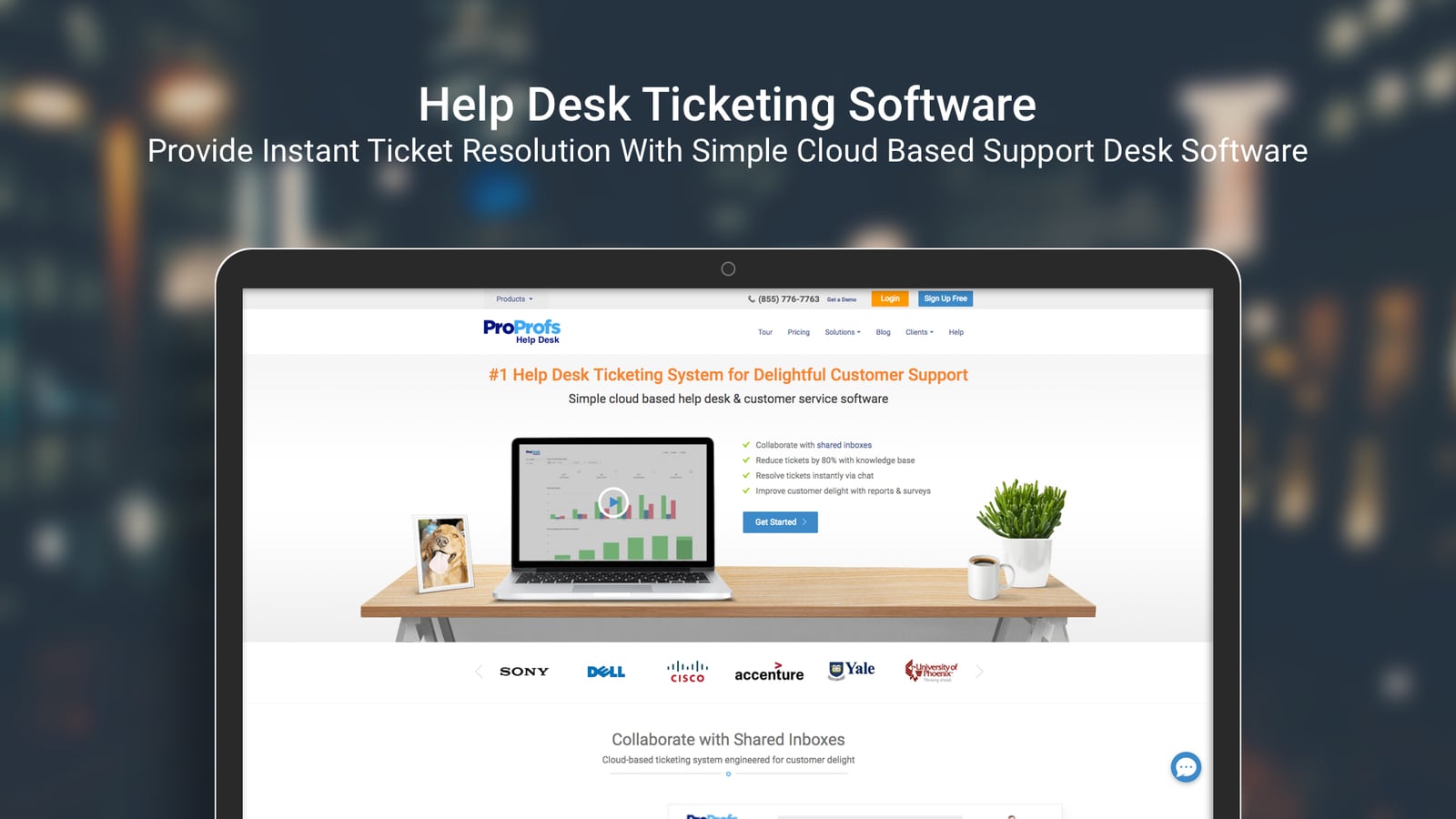
ProProfs Help Desk product interface.
ProProfs Help Desk is a cloud-based support tool designed for teams that need to move beyond a basic shared email inbox without adopting a heavyweight enterprise platform. It consolidates customer conversations from email, live chat, and messaging into a single ticketing interface, then layers AI chatbots, canned responses, SLA tracking, and reporting on top.
The platform serves a broad range of industries, including software, IT, eCommerce, retail, hospitality, financial services, and manufacturing. The core promise is simple: give support teams one place to manage all inbound communication, and give customers a self-service knowledge base that reduces the number of tickets that ever need human attention. ProProfs claims self-service can reduce ticket volume by up to 80%, though actual results depend heavily on how well your knowledge base is written and maintained.
Who Should Use ProProfs Help Desk?

ProProfs Help Desk Review 2026: Pros, Cons & Pricing - Who Should Use ProProfs Help Desk?.
ProProfs Help Desk is best suited for small to mid-sized teams that need structure without complexity. If you are currently managing support through a shared Gmail inbox, forwarding messages between teammates, and losing track of who replied to whom, ProProfs offers a meaningful upgrade. The interface is intentionally familiar, which reduces the learning curve for agents who are used to email.
It is also a reasonable fit for teams that want an all-in-one suite rather than stitching together separate tools for tickets, chat, and knowledge base. Because ProProfs bundles these capabilities, you avoid the integration overhead that comes with connecting a standalone help desk to a separate live chat product.
However, larger enterprises or teams with complex, multi-department workflows may find the platform limiting. If you need deep customization, advanced automation rules, or extensive third-party integrations, a more robust option like Zoho Desk or Freshdesk may be a better match. For a broader look at how service desk platforms compare, see this guide to service desk platforms.
Core Features: What You Actually Get
Omnichannel Ticketing
ProProfs centralizes email, live chat, and messaging conversations into a unified ticket queue. Agents can see the full conversation history for each customer, assign tickets to teammates, set priorities, and track status from open to resolved. The shared inbox model means no more duplicate replies or missed messages when multiple agents are working the same queue.
AI Chatbots and Self-Service
The platform includes AI chatbots that can handle common questions around the clock. When a customer asks something the bot can answer from your knowledge base, the ticket never reaches a human agent. This is the mechanism behind ProProfs' claim of reducing ticket volume by up to 80%. In practice, the quality of your knowledge base determines how effective the chatbot is. Thin or outdated articles will lead to frustrated customers and escalation.
Knowledge Base
ProProfs includes a customer-facing knowledge base builder that lets you create help articles, FAQs, and troubleshooting guides. The knowledge base integrates with the chatbot and can be embedded on your website. Teams that invest time in building a solid article library tend to see the biggest reduction in repetitive tickets.
Canned Responses and Automation
Pre-written responses for common queries help agents reply faster and maintain consistent messaging. You can also set up SLA rules to track response and resolution times, which keeps the team accountable and gives managers visibility into performance.
Reporting and Analytics
ProProfs provides dashboards and reports on key support metrics, including ticket volume, response times, resolution rates, and customer satisfaction. The reporting is functional for basic performance tracking, though users consistently note that advanced reporting capabilities are limited compared to enterprise-grade tools.
Customer Satisfaction Surveys
Built-in CSAT surveys let you measure customer happiness after each interaction. This closes the feedback loop without requiring a separate survey tool.
Setup and Ease of Use
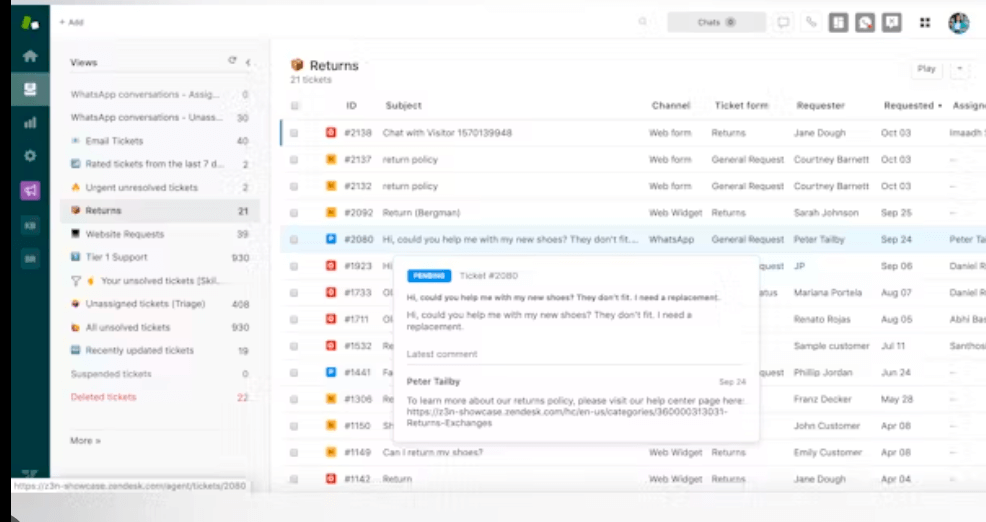
ProProfs Help Desk Review 2026: Pros, Cons & Pricing - Setup and Ease of Use.
One of ProProfs Help Desk's strongest selling points is its approachable interface. Multiple user reviews describe it as Gmail-like, which means agents can start working with minimal training. The dashboard is clean, ticket views are intuitive, and common actions like assigning, tagging, and replying are easy to find.
Setup is generally quick. You can connect your support email address, configure basic ticket routing rules, and invite team members within a few hours. The platform offers a free trial and a 15-day money-back guarantee, so you can test the workflow before committing.
That said, some users report that the initial onboarding process can feel a bit bumpy. Configuration options are not always where you expect them, and certain settings require digging through menus. The learning curve is still modest compared to more complex platforms, but it is not entirely friction-free.
Pricing: What to Expect
ProProfs Help Desk pricing starts at $19.99 per user per month on an annual billing cycle for the Essentials plan. Higher tiers, Business and Business Elite, unlock more advanced features such as additional automation, deeper reporting, and expanded integration options. A free trial is available, along with a 15-day money-back guarantee.
Here is the key pricing signal: the entry-level price is competitive for a help desk with built-in chat and knowledge base. However, the per-user model means costs scale linearly as your team grows. A 10-agent team on the Essentials plan would pay roughly $200 per month, which is reasonable but not the cheapest option in the market.
For comparison, if you are evaluating multiple AI support platforms, this Intercom vs Ada comparison breaks down how pricing and AI resolution capabilities differ across two popular alternatives. And if you want a broader view of AI-first support tools, the ClickDesk review covers another budget-friendly option.
Strengths: What ProProfs Does Well
Familiar, low-friction interface. The Gmail-like design is repeatedly cited as a major plus. Agents adapt quickly, which means faster time-to-value and less training overhead.
All-in-one suite. Having tickets, live chat, knowledge base, and surveys in one platform eliminates the need for multiple subscriptions and reduces integration complexity.
Responsive customer support. ProProfs consistently earns high marks for its own support team. Users report quick, helpful responses when they run into issues.
Affordable entry point. At $19.99 per user per month, the Essentials plan is accessible for small teams that need professional ticketing without enterprise pricing.
Solid ticket management fundamentals. Core features like assignment, prioritization, canned responses, and SLA tracking work reliably and cover the basics well.
Limitations: Where ProProfs Falls Short
Limited integrations. This is the most common complaint across user reviews. While ProProfs integrates with tools like Slack, Jira, ClickUp, BigCommerce, Salesforce, MS Dynamics, and Shopify, the overall integration ecosystem is narrower than competitors like Zendesk or Freshdesk. Teams that rely on niche or industry-specific tools may hit walls.
Weak social media integration. Users specifically call out the lack of robust social media channel support. If Facebook, Instagram, or X (Twitter) are major support channels for your business, ProProfs may not cover them well.
Basic reporting. The analytics dashboards cover essential metrics, but advanced reporting, custom report building, and deep data exploration are limited. Data-driven teams may outgrow the built-in reporting.
Limited customization. The platform offers fewer options for customizing ticket workflows, fields, and automation rules compared to more mature help desk solutions.
Onboarding friction. While the interface is easy to use, the initial setup and configuration process can be less intuitive than the day-to-day experience.
ProProfs Help Desk vs. Alternatives
Choosing a help desk comes down to your team's size, support channels, and integration needs. Here is how ProProfs stacks up against common alternatives:
| Criteria | ProProfs Help Desk | Freshdesk | Zoho Desk | Intercom |
|---|---|---|---|---|
| Starting price | $19.99/user/month | Free tier available; paid from ~$15/user/month | ~$14/user/month | Custom pricing, generally higher |
| Best for | Small teams wanting an all-in-one suite | Teams needing strong automation and multi-channel | Teams already in Zoho ecosystem | Product-led companies focused on AI and in-app support |
| AI capabilities | Chatbot + self-service | AI-powered suggestions and routing | Zia AI assistant | Fin AI agent with high automation |
| Integration depth | Moderate | Extensive | Extensive | Extensive |
| Ease of use | High | Moderate | Moderate | Moderate |
If you are weighing ProProfs against other platforms, this Intercom vs OTRS vs Chatwoot comparison provides a useful framework for evaluating AI support, pricing, and customization across different tool categories.
Decision Criteria: Is ProProfs Right for You?
Choose ProProfs Help Desk if:
- You are a small to mid-sized team currently using email or a basic shared inbox.
- You want tickets, chat, and knowledge base in one platform without complex setup.
- Your support channels are primarily email and website chat.
- You value ease of use and fast agent onboarding over deep customization.
- Your integration needs are covered by the available connectors (Slack, Jira, Salesforce, Shopify, etc.).
Look elsewhere if:
- Social media is a major support channel for your business.
- You need advanced, customizable reporting and analytics.
- Your workflows require complex automation rules or custom fields.
- You rely on a wide range of third-party tools that need native integrations.
- You are a large enterprise with multi-department support operations.
Related reading
- No-Code AI Agents: 12 Builders Tested for 2026 - Compare the best no-code AI agent builders for 2026, from Pickaxe and n8n to Voiceflow and Botpress. Find the right platform for your use case and budget.
Sources and further reading
- Reviews of ProProfs Help Desk - Capterra - We got ProProfs Help desk before the pandemic and we are glad that we didn't have to invest much with its use. If anything, we got to save some on the support ...
- ProProfs Help Desk Review: Pros, Cons, Features and Pricing - ProProfs Help Desk stands out for its user-friendly interface and comprehensive support features, making it a top choice for teams prioritizing ease-of-use.
- ProProfs Help Desk Reviews 2026 - Pros & Cons - Read more about ProProfs Help Desk reviews and it's Pros and Cons, Explore ProProfs Help Desk customer reviews and read its latest in depth real reviews by its users.
Frequently Asked Questions
Is ProProfs Help Desk good for small businesses?
Yes. ProProfs Help Desk is well-suited for small businesses because of its affordable entry-level pricing, intuitive interface, and bundled feature set. Teams can get organized quickly without a steep learning curve or expensive implementation.
Does ProProfs Help Desk offer a free plan?
ProProfs offers a free trial and a 15-day money-back guarantee, but it does not advertise a permanent free plan. The entry-level Essentials plan starts at $19.99 per user per month on annual billing.
What integrations does ProProfs Help Desk support?
ProProfs integrates with Slack, Jira, ClickUp, BigCommerce, Salesforce, MS Dynamics, and Shopify, among others. It also offers an API for custom integrations. However, the overall integration library is smaller than some competitors, and social media integrations are limited.
Can ProProfs Help Desk reduce ticket volume?
The platform claims self-service features can reduce ticket volume by up to 80%. This depends on the quality and coverage of your knowledge base. Well-maintained help articles combined with the AI chatbot can deflect a significant portion of repetitive questions.
How does ProProfs Help Desk compare to Freshdesk?
ProProfs is generally easier to use and more affordable at the entry level, while Freshdesk offers more advanced automation, broader integrations, and stronger multi-channel support. Teams with complex workflows may prefer Freshdesk; teams wanting simplicity may prefer ProProfs.
Conclusion
ProProfs Help Desk delivers on its core promise: a straightforward, all-in-one support platform that small and mid-sized teams can adopt quickly. The Gmail-like interface, bundled live chat and knowledge base, and responsive vendor support make it a practical choice for teams that need to organize their support operations without enterprise complexity.
The trade-offs are real, though. Limited integrations, weak social media support, and basic reporting mean ProProfs is not the right fit for every team. If your support operation depends on deep third-party connectivity or advanced analytics, you will likely outgrow the platform or find it frustrating from day one.
Ultimately, ProProfs Help Desk earns its place as a solid mid-tier option. It is not the most powerful help desk on the market, but for the right team size and use case, it offers strong value at a reasonable price. Take advantage of the free trial, test your actual workflows, and pay close attention to whether the integration and reporting limitations affect your day-to-day operations before committing.