Customer.io Review 2026: Pros, Cons, Pricing & Verdict

Customer.io Review 2026: Is It the Right Engagement Platform for Your Team?
Customer.io is one of those tools that rarely comes up in casual marketing conversations — until a team hits the limits of basic email platforms and starts hunting for something more powerful. Founded in 2012 and now serving over 9,000 brands with more than 100 billion messages sent, it has quietly become a serious contender in the customer engagement space. But is it the right fit for you?
This review breaks down what Customer.io actually does well, where it falls short, what it costs, and who should — and shouldn't — invest in it.
What Is Customer.io?

Customer.io product interface.
Customer.io is a data-driven customer engagement platform built for teams that want to send highly personalized, behavior-triggered messages across email, push notifications, in-app messages, SMS, and webhooks. Unlike traditional email marketing tools that center on lists and campaigns, Customer.io centers on events and user profiles. Every action a user takes — signing up, upgrading, abandoning a cart, hitting a usage milestone — can trigger a tailored message.
The platform leans heavily on first-party data. That means it works best when you already track meaningful user events through your product, website, or app. If you have that data flowing, Customer.io turns it into automated, multi-channel customer journeys.
Who Is Customer.io For?

Customer.io product interface.
Customer.io is not a one-size-fits-all tool. It's built for a specific type of team.
Ideal users
- Product-led SaaS companies that need lifecycle messaging tied to in-app behavior
- Technical marketing teams comfortable with event data, APIs, and logic-based workflows
- Data-heavy organizations already using tools like Segment, Snowflake, or a CDP
- Teams needing HIPAA compliance or advanced data governance
- Developers who want a transactional messaging API without a full marketing suite
Less ideal for
- Solopreneurs or small businesses looking for a simple newsletter tool
- Non-technical marketers who want plug-and-play templates and drag-and-drop simplicity
- Teams with unpredictable list growth who need predictable, flat pricing
- Anyone who wants all features accessible without deep setup or Liquid templating
If you're comparing support platforms rather than marketing automation, our Intercom vs LiveAgent comparison covers a different category of tools.
Where Customer.io Shines

Customer.io product interface.
1. Flexible visual workflow builder
The workflow builder is the heart of Customer.io. It's a drag-and-drop canvas where you can map out complex, branching customer journeys. You can trigger messages based on events, wait for specific conditions, split audiences, and route users down different paths — all visually.
This flexibility is rare. Many competitors offer linear automation sequences, but Customer.io lets you build genuinely multi-branch journeys that reflect real user behavior.
2. Deep segmentation engine
Segmentation in Customer.io goes far beyond basic demographic filters. You can segment users based on:
- Custom events and event properties
- User traits and attributes
- Behavioral patterns over time
- Message engagement history
- Data from connected sources
This event-based approach means you can target users who, for example, "signed up 7 days ago, haven't completed onboarding, and opened at least one email." That level of precision is hard to replicate in simpler tools.
3. Liquid templating and personalization
Customer.io uses Liquid, an open-source templating language, for content personalization. If you're comfortable with Liquid, you can build highly dynamic messages that pull in user-specific data, conditional content blocks, and even logic-based variations.
The trade-off: Liquid has a learning curve. Non-technical users may find it intimidating, but developers and technically inclined marketers often appreciate the control it provides.
4. True multichannel messaging
Customer.io supports email, push notifications, in-app messages, SMS, and webhooks from a single platform. This matters for product-led teams that need consistent messaging across channels. You can, for example, send an onboarding email, follow up with an in-app message if the user doesn't engage, and trigger a push notification as a final nudge — all within one workflow.
5. Strong developer integrations
Customer.io plays well with the modern data stack. It integrates with Segment, Snowflake, Redshift, BigQuery, and other data platforms. The API is well-documented, and the platform supports webhooks for custom integrations.
For developers, there's also Customer.io Builders, a pay-as-you-go transactional messaging product starting at $0.40 per 1,000 messages. It's designed for teams that need reliable API-driven email without the full marketing platform.
Where Customer.io Falls Short
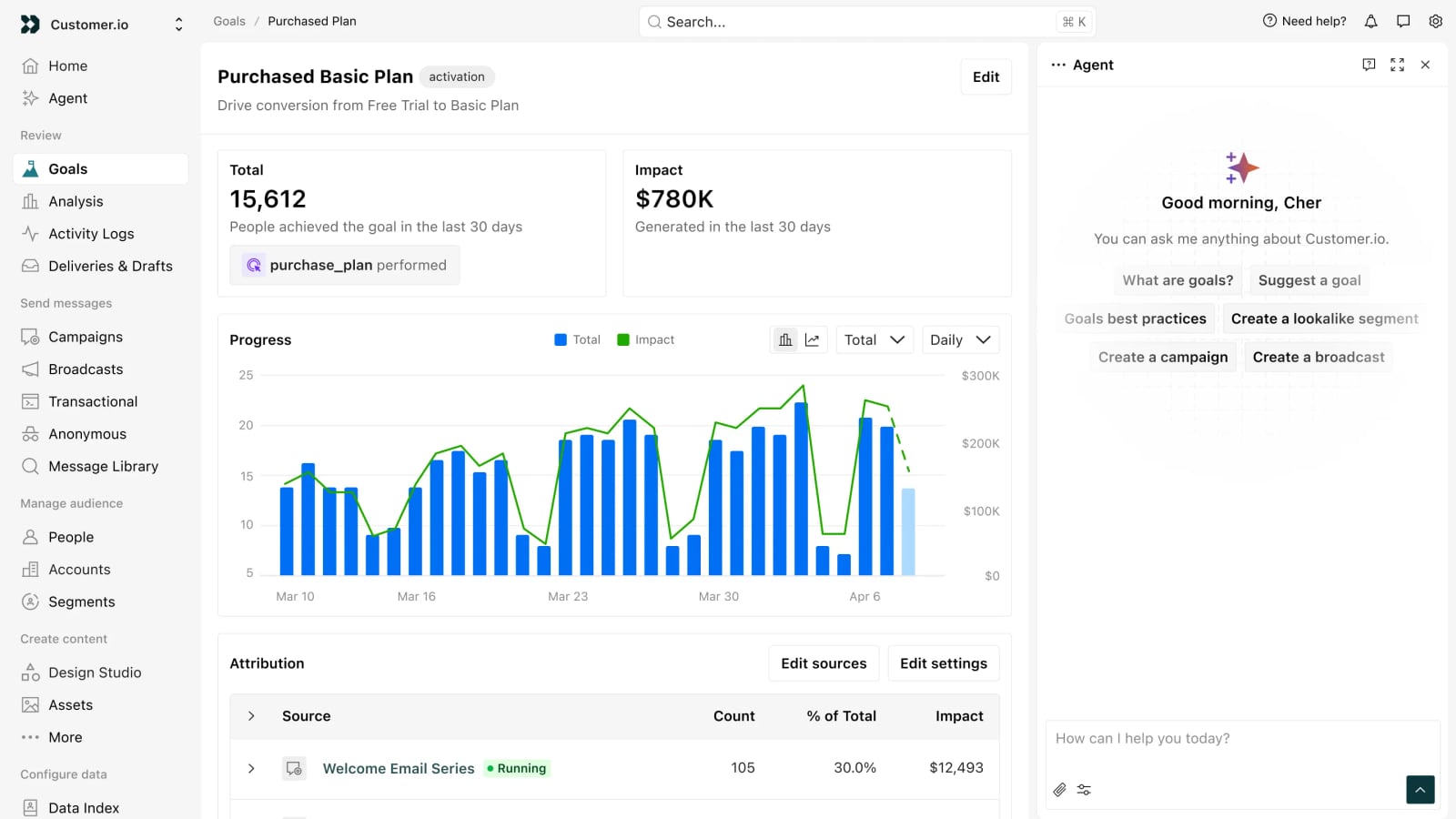
Customer.io product interface.
1. Pricing scales aggressively
Customer.io's pricing is one of its most frequently cited drawbacks. The Essentials plan starts at $100 per month for 5,000 profiles and includes up to 1 million email sends. That sounds generous — but the price climbs quickly as your profile count grows.
Once you pass 10,000 profiles, costs can jump significantly. The Premium plan starts at $1,000 per month, and Enterprise pricing is custom. If your list grows unpredictably, budgeting becomes a challenge.
2. Steep learning curve
Customer.io is powerful, but it's not beginner-friendly. The interface assumes you understand event-based data models, segmentation logic, and — ideally — Liquid templating. Many features are buried behind layers of configuration.
Teams without a technical resource often report slow setup times and frustration. The documentation is thorough but assumes a technical reader.
3. Limited reporting and analytics
Reporting is a weak spot. While Customer.io provides basic metrics like opens, clicks, and conversions, advanced reporting often requires exporting data to external tools. If you need deep campaign analytics, cohort analysis, or revenue attribution built into the platform, you may be disappointed.
4. No free plan
Customer.io offers a 14-day free trial with no credit card required, but there's no permanent free tier. For small teams or solo founders who want to test the waters without commitment, this is a barrier. The startup program exists but requires an application.
5. Email editor feels basic
While the workflow builder is excellent, the email editor itself is functional but unpolished. It lacks the visual polish and template variety of tools like Mailchimp or Klaviyo. Teams that prioritize beautiful, design-heavy emails may find it limiting.
Customer.io Pricing Breakdown
| Plan | Starting Price | What You Get |
|---|---|---|
| Essentials | $100/month | 5,000 profiles, 1M email sends, visual workflows, 2 object types, basic integrations |
| Premium | $1,000/month | Custom profile count, 10 object types, HIPAA compliance, premium support, advanced integrations |
| Enterprise | Custom | Dedicated hardware, CSM, migration help, audit logging, everything in Premium |
| Builders | $0.40 per 1,000 messages | Pay-as-you-go transactional messaging for developers |
Key pricing signals to watch:
- Profile count is the primary cost driver, not email volume
- Email send limits apply even on paid plans
- Premium and Enterprise require sales conversations
- Additional users and features can add up quickly
For context on how other platforms handle pricing transparency, see our Talkdesk pricing breakdown — it illustrates how enterprise SaaS pricing often works in practice.
Setup and Onboarding Experience
Getting started with Customer.io requires more upfront work than most email tools. Here's what to expect:
- Data planning: You need to define what events and user traits you'll track before building anything meaningful.
- Integration setup: Connecting your product, website, or data warehouse takes technical work.
- Workflow design: Building your first journeys requires understanding the workflow builder's logic.
- Template creation: Email templates need to be built or adapted — often with Liquid for personalization.
Teams with dedicated engineering resources typically get up and running faster. Teams without technical support often report a slower, more frustrating onboarding process. Premium support and onboarding assistance are available — but only on higher-tier plans.
Customer.io vs. Alternatives: Decision Criteria
When deciding whether Customer.io is right for you, consider these questions:
Choose Customer.io if:
- You have a technical team that can manage data flows and setup
- You need advanced behavioral targeting with custom events
- You want multichannel messaging from a single platform
- You already use tools like Segment, Snowflake, or a CDP
- You need HIPAA compliance or custom onboarding
Look elsewhere if:
- You want predictable pricing as your list grows
- You need unlimited email sending on all plans
- You prefer a tool that works out of the box
- You don't want to rely on engineers or Liquid logic
- You want fast, clear reporting without exporting data
If you're evaluating broader customer communication tools, our Intercom vs HappyFox vs OTRS comparison covers support-focused platforms with different strengths.
Customer.io Review: Final Verdict
Customer.io earns its reputation as a powerful, flexible engagement platform for technical teams. The workflow builder, segmentation engine, and multichannel capabilities are genuinely best-in-class. For product-led SaaS companies with solid data infrastructure, it's one of the strongest options available.
But that power comes with real trade-offs. The learning curve is steep, pricing scales aggressively, and reporting feels underdeveloped compared to the rest of the platform. Non-technical teams will likely find it frustrating, and small businesses may find the cost hard to justify.
Overall rating: 3.9/5
Customer.io is excellent at what it does — but what it does isn't for everyone. If you're a technical team that needs deep automation and behavioral targeting, it's worth the investment. If you're looking for simplicity, predictable pricing, or marketer-friendly workflows, explore alternatives before committing.
Sources and further reading
- Customer.io Reviews - Trustpilot - How many stars would you give Customer.io? Join the 24 people who've already contributed. Your experience matters.
- A Comprehensive Review of Customer.io (2026) - Customer.io is a very smart email marketing software, but it has two drawbacks: price and complexity of use. Find out why!
- Customer.io Reviews 2026: Details, Pricing, & Features | G2 - What do users say? ... Users consistently praise the flexibility and personalization capabilities of Customer.io, which allow for highly targeted messaging across ...
FAQ
Is Customer.io a CRM?
No. Customer.io is a customer engagement and messaging platform, not a CRM. It doesn't manage sales pipelines, deals, or contact relationships in the traditional CRM sense. However, it can integrate with CRMs and other data sources to power personalized messaging.
Is Customer.io HIPAA compliant?
Yes, but only on the Premium plan and above. HIPAA compliance requires a Business Associate Agreement (BAA), which is available to Premium and Enterprise customers. The Essentials plan does not include HIPAA compliance.
Is Customer.io GDPR compliant?
Yes. Customer.io provides GDPR compliance features, including data processing agreements, data export and deletion capabilities, and tools for managing consent. As with any platform, your specific compliance depends on how you configure and use the tool.
Who are the main competitors of Customer.io?
Key competitors include Braze, Iterable, Klaviyo, ActiveCampaign, and Encharge. Braze and Iterable target similar enterprise and product-led use cases, while Klaviyo focuses more on e-commerce. Encharge positions itself as a simpler, more marketer-friendly alternative.
Does Customer.io have a free plan?
No. Customer.io offers a 14-day free trial with no credit card required, but there is no permanent free tier. The startup program provides discounts for eligible early-stage companies, but it requires an application.
What is Customer.io Builders?
Builders is a pay-as-you-go transactional messaging product from Customer.io, designed for developers. It starts at $0.40 per 1,000 messages and provides API-driven email sending without the full marketing platform. It's ideal for transactional emails like password resets, receipts, and system notifications.
Conclusion
Customer.io is a tool that rewards technical investment. Teams that put in the setup work get a flexible, powerful engagement platform capable of sophisticated, behavior-driven messaging across multiple channels. Teams that expect an out-of-the-box experience will likely struggle.
The decision ultimately comes down to your team's technical capacity, your data maturity, and your budget flexibility. If you have all three, Customer.io deserves serious consideration. If any of those are lacking, you may find a better fit elsewhere — and that's okay. The best tool is the one that matches how your team actually works.
For more platform comparisons and evidence-based reviews, check out our Ultimate AI review or explore internal helpdesk software options if you're evaluating tools for IT teams.