Internal Helpdesk Software: 7 Top Tools for IT Teams in 2026

Internal Helpdesk Software: A Practical Guide for IT Teams in 2026
Internal helpdesk software is the operational backbone of IT teams that support employees rather than external customers. It turns scattered emails, Slack messages, and hallway interruptions into a structured queue of trackable, prioritized, and resolvable tickets. The right platform reduces resolution time, gives leadership visibility into recurring issues, and helps employees help themselves through self-service. The wrong one creates a second job for your IT staff.
This guide breaks down what internal helpdesk software actually does, the features that matter most, how AI is changing the category, and how to evaluate tools for your team size, compliance needs, and budget.
What Is Internal Helpdesk Software?
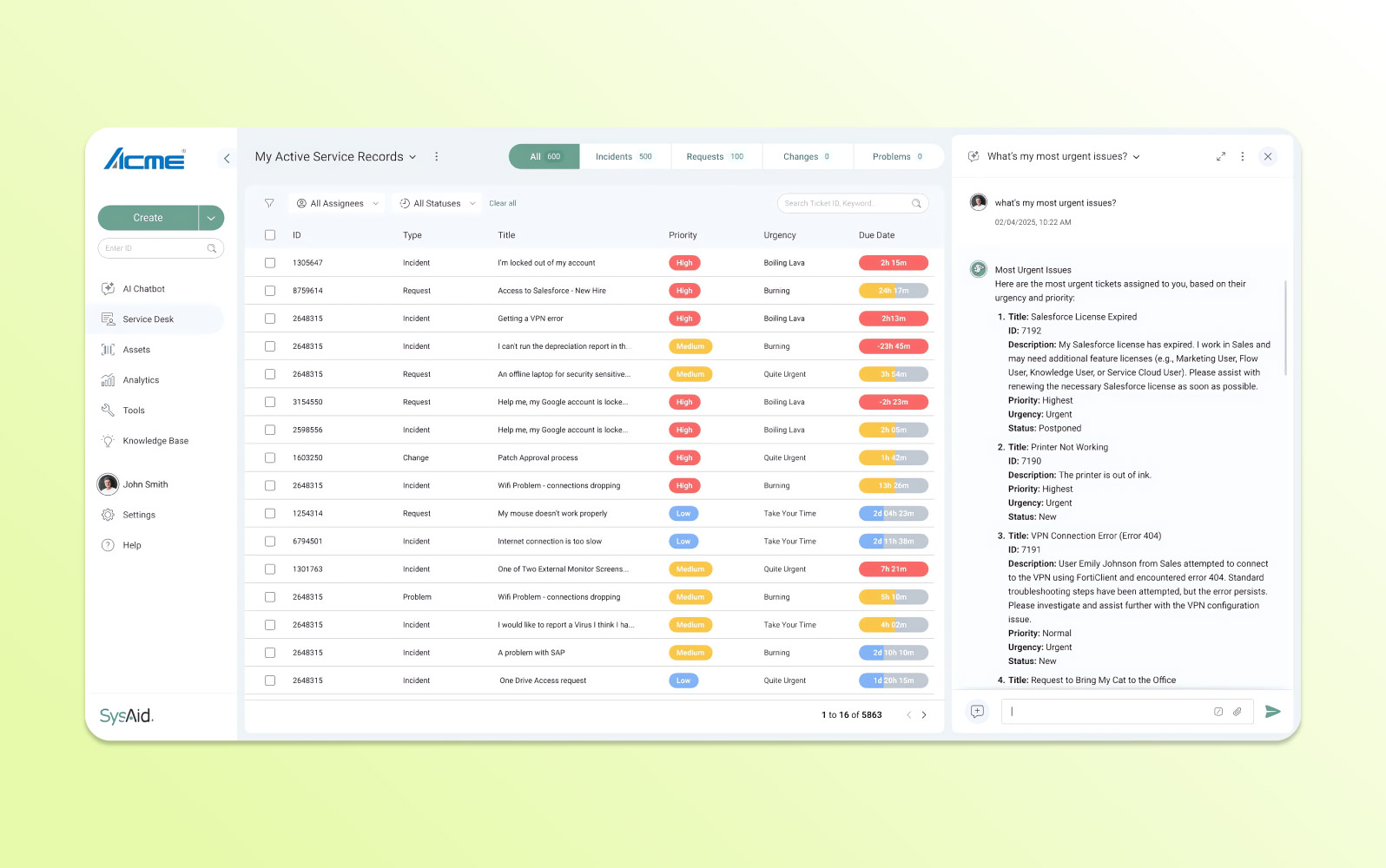
Internal Helpdesk Software: 7 Top Tools for IT Teams in 2026 - What Is Internal Helpdesk Software?.
Internal helpdesk software is a ticketing and service management system designed for employee-facing IT support. Unlike customer support software, which optimizes for external satisfaction metrics, internal helpdesk tools prioritize internal SLAs, asset tracking, change management, and integration with the systems your company already runs on.
At minimum, the software should consolidate requests from multiple channels—email, chat, a web portal, and increasingly Microsoft Teams or Slack—into one queue. From there, it routes tickets to the right person or team, tracks response and resolution deadlines, and gives IT leaders a dashboard of workload and performance.
Many platforms extend beyond ticketing into asset management, knowledge bases, approval workflows, and even project management. The goal is organizational consistency: every employee request follows the same path, and nothing falls through the cracks.
Why Generic Ticketing Tools Fall Short for Internal IT

Internal Helpdesk Software: 7 Top Tools for IT Teams in 2026 - Why Generic Ticketing Tools Fall Short for Internal IT.
A common mistake is repurposing a customer-facing helpdesk for internal IT. The use cases overlap, but the requirements diverge in important ways.
Internal IT teams typically need:
- SLA management tied to internal priorities, not customer satisfaction scores
- Asset and inventory tracking linked to tickets, so a laptop repair request shows the device history
- Approval workflows for software access, hardware purchases, or security exceptions
- Integration with identity providers like Azure AD or Okta for automatic user recognition
- Compliance controls such as audit logs, role-based access, and data residency options
Deskpro, for example, explicitly positions its IT service desk as built for both internal and external support, with SLA management, multi-channel intake through Slack and Teams, and private deployment options for regulated industries. That distinction matters if your IT data cannot live on shared public cloud infrastructure.
Key Features to Evaluate

Internal Helpdesk Software: 7 Top Tools for IT Teams in 2026 - Key Features to Evaluate.
1. Omnichannel Ticket Intake
Employees will contact IT however is most convenient for them. A strong internal helpdesk captures requests from email, a self-service portal, live chat, and collaboration tools like Slack and Microsoft Teams. Consolidating these into one interface prevents duplicate tickets and ensures nothing is missed.
2. Automation and Routing Rules
Manual ticket triage is a time sink. Look for no-code automation that routes tickets by category or urgency, triggers SLA alerts, auto-assigns to on-call engineers, and sends notifications based on rules you define. Deskpro's automation engine, for instance, handles routing, escalation, approvals, and notifications without requiring a dedicated administrator to configure every workflow.
3. Self-Service and Knowledge Base
A well-maintained knowledge base deflects repetitive requests before they become tickets. Password resets, VPN setup guides, and software installation instructions should be searchable by employees without contacting IT. The best platforms pair the knowledge base with an AI-powered chatbot that can answer common questions and guide users to the right article.
4. SLA Tracking and Reporting
Internal SLAs define how quickly IT must respond to and resolve different ticket priorities. The software should track these deadlines automatically, escalate breaching tickets, and generate compliance reports. Real-time dashboards showing team workload, ticket volume trends, and first-contact resolution rates give IT directors the data to justify headcount and identify bottlenecks.
5. Asset and Change Management
For many IT teams, the helpdesk is also the system of record for hardware and software assets. Linking tickets to specific devices, tracking warranty information, and managing change requests from the same interface reduces context switching. HaloITSM, PCMag's Editors' Choice for IT help desk software, includes asset management alongside its ticketing features.
6. Deployment Flexibility and Compliance
Not every organization can run its helpdesk on public cloud infrastructure. Government agencies, financial institutions, and healthcare providers often require on-premises, VPC, or sovereign cloud deployment to meet data residency and audit requirements. Deskpro Private, for example, gives IT teams full control over where their data lives while retaining the full feature set, including AI and automation.
How AI Is Reshaping Internal Helpdesks
Internal Helpdesk Software: 7 Top Tools for IT Teams in 2026 - How AI Is Reshaping Internal Helpdesks.
AI has moved from a differentiator to a core expectation in internal helpdesk software. The most useful applications in 2026 include:
- Automated ticket classification: AI reads incoming tickets and assigns category, priority, and routing without human intervention
- Suggested responses: Agents get AI-drafted replies based on similar historical tickets, which they can review and send in one click
- Ticket summarization: Long email threads are condensed into actionable summaries, reducing agent ramp-up time
- Knowledge base generation: AI drafts help center articles from resolved tickets, turning tribal knowledge into searchable documentation
- Sentiment detection: Flags frustrated employees so agents can adjust their approach
A critical consideration is data security. Some platforms route ticket data through third-party public AI models, which may violate internal policies. Deskpro, for example, allows IT teams to control which AI models power workflows, including private or self-hosted LLMs, keeping all processing within a defined data boundary.
For teams evaluating AI-first platforms more broadly, our comparison of Intercom and Ada examines how AI resolution rates and pricing transparency differ across leading support platforms. While that comparison focuses on customer-facing support, the AI evaluation criteria apply to internal helpdesks as well.
Top Internal Helpdesk Software Options in 2026
HaloITSM
PCMag's Editors' Choice for IT help desk software, HaloITSM follows ITIL best practices and offers a modern interface with extensive AI features and automated ticket management. Pricing is based solely on the number of support staff, with no tier-based feature restrictions. It suits SMBs serious about ITIL and teams handling high ticket volumes.
Deskpro
Deskpro distinguishes itself with deployment flexibility. It offers cloud, on-premises, VPC, and sovereign cloud options, making it a strong candidate for regulated industries. The platform includes omnichannel intake, no-code automation, SLA tracking, and AI features that can run on private or self-hosted LLMs. It integrates natively with Microsoft Teams, Slack, Jira, Azure AD, Okta, and Salesforce.
Spiceworks Cloud Help Desk
A popular free option for small IT teams, Spiceworks Cloud Help Desk provides core ticketing, a user portal, and basic reporting at no cost. It is a reasonable starting point for teams with limited budgets, though advanced features like asset management and AI automation require upgrades or third-party tools.
Freshworks Freshservice
Freshservice is an IT service management platform that extends beyond ticketing into asset management, change management, and project management. It offers a clean interface and strong automation capabilities, with pricing that scales by feature tier and agent count.
Atlassian Service Collection
Atlassian's Jira Service Management anchors this collection, offering deep integration with Jira for development teams and Confluence for knowledge management. It is a natural fit for organizations already invested in the Atlassian ecosystem, though configuration can be complex for smaller teams.
Intercom
While Intercom is primarily known as an AI-first customer service platform, its shared inbox, automation, and AI capabilities can support internal employee support use cases for teams that want a modern, conversational interface. Intercom's Fin AI Agent resolves routine questions instantly, while the Copilot assistant helps human agents draft and summarize responses. For organizations evaluating Intercom against other support platforms, our Intercom vs Chatwoot comparison breaks down AI support, pricing, and scalability differences.
VersaSRS Oasis
For organizations with strict hosting requirements, VersaSRS Oasis offers on-premises deployment with powerful functionality, though its interface is dated compared to modern SaaS platforms. IT managers in high-trust environments cite its on-prem hosting as a key advantage.
How to Choose the Right Internal Helpdesk
Start with Your Non-Negotiables
Before comparing features, list your hard requirements:
- Deployment: Do you need on-premises, private cloud, or is public SaaS acceptable?
- Compliance: What data residency, audit, and encryption requirements apply?
- Integrations: Which identity providers, collaboration tools, and asset management systems must connect?
- Budget: Is pricing per agent, per employee, or tier-based?
Match Complexity to Team Size
A five-person IT team supporting 200 employees has different needs than a 50-person IT organization supporting 10,000. Smaller teams benefit from tools that work out of the box with minimal configuration. Larger organizations need granular permissions, advanced automation, and reporting that can slice data by department, agent, or ticket type.
Evaluate AI with a Security Lens
Ask vendors exactly how AI features process your data. Does ticket content leave your environment? Can you use private or self-hosted models? What controls exist to prevent sensitive employee information from being used to train external models? These questions are especially important for healthcare, finance, and government IT teams.
Test with Real Workflows
Most vendors offer free trials. Run a realistic pilot: create tickets from email, Slack, and the portal; configure an SLA; test the knowledge base search; and generate a report. The friction you encounter during setup is a preview of daily operations.
Related reading
- Intercom vs Wonderchat vs Chatwoot: 2026 Comparison - Compare Intercom, Wonderchat, and Chatwoot on AI resolution, pricing, channels, data ownership, and ideal use cases. Find the right support platform for your team.
Sources and further reading
- What's everyone using for internal IT help desk / ticketing these days? - Aug 17, 2025 ... VersaSRS oasis. UI is old. But the software is powerful. We also have hi trust requirements and can host it on prem so that's good.
- The Best IT Help Desk Software for 2026 - IT help desk software enables your support team to track and resolve whatever issues your company's employees encounter. We've tested the top solutions to help you choose the right one for your small business.
- IT Help Desk Software & Ticketing Support | AI-Enabled, Internal IT Help Desk for Enterprise - IT ticketing system that automates key support processes for your IT Team. A ticketing system that allows support staff to handle requests productively.
Frequently Asked Questions
What is the difference between internal helpdesk software and customer support software?
Internal helpdesk software serves employees and focuses on internal SLAs, asset management, approval workflows, and integration with identity providers. Customer support software optimizes for external satisfaction metrics, multi-channel customer communication, and often includes features like social media ticketing. Some platforms, like Deskpro, support both use cases from one system.
Can internal helpdesk software be self-hosted?
Yes. Several platforms, including Deskpro and VersaSRS Oasis, offer on-premises or private cloud deployment for organizations with data residency, compliance, or security requirements. Self-hosting typically requires additional infrastructure setup time compared to cloud deployment.
How does AI help internal IT teams?
AI automates ticket classification and routing, suggests agent responses, summarizes long threads, generates knowledge base articles from resolved tickets, and detects sentiment. Some platforms allow IT teams to use private or self-hosted LLMs to keep data within their defined boundary.
What is a reasonable budget for internal helpdesk software?
Free options like Spiceworks Cloud Help Desk exist for small teams. Paid platforms typically charge per agent, with prices ranging from roughly $15 to $100+ per agent per month depending on features. Some vendors, like HaloITSM, price only on agent count without tier-based feature restrictions.
How long does implementation take?
Cloud-based internal helpdesk platforms can often be operational within weeks for mid-market teams. Private deployments add infrastructure setup time. Migrating from an existing ticketing system may require additional data migration support, which most vendors offer.
Conclusion
Internal helpdesk software is an investment in IT team efficiency and employee experience. The best platform for your organization depends on deployment requirements, compliance constraints, integration needs, and how aggressively you want to adopt AI automation.
Start by defining your non-negotiables, then run realistic trials with your actual workflows. Whether you choose an ITIL-focused platform like HaloITSM, a deployment-flexible option like Deskpro, or an AI-first approach like Intercom, the goal is the same: faster resolutions, fewer repetitive tickets, and clearer visibility into IT performance.
For a deeper look at how leading support platforms compare on AI resolution, pricing, and scalability, see our Intercom vs OTRS vs Chatwoot comparison or explore our ProProfs Help Desk review for an evidence-based assessment of another popular option.