Dialpad Review 2026: AI Contact Center Tested
Dialpad Review 2026: AI Contact Center Tested
Dialpad is an AI-native, Agentic AI-powered omnichannel contact center and communications platform. It promises to transform customer experience at scale, but does it deliver? This review examines its strengths, limitations, pricing signals, and ideal users based on hands-on testing and user feedback.
What Is Dialpad?

Dialpad product interface.
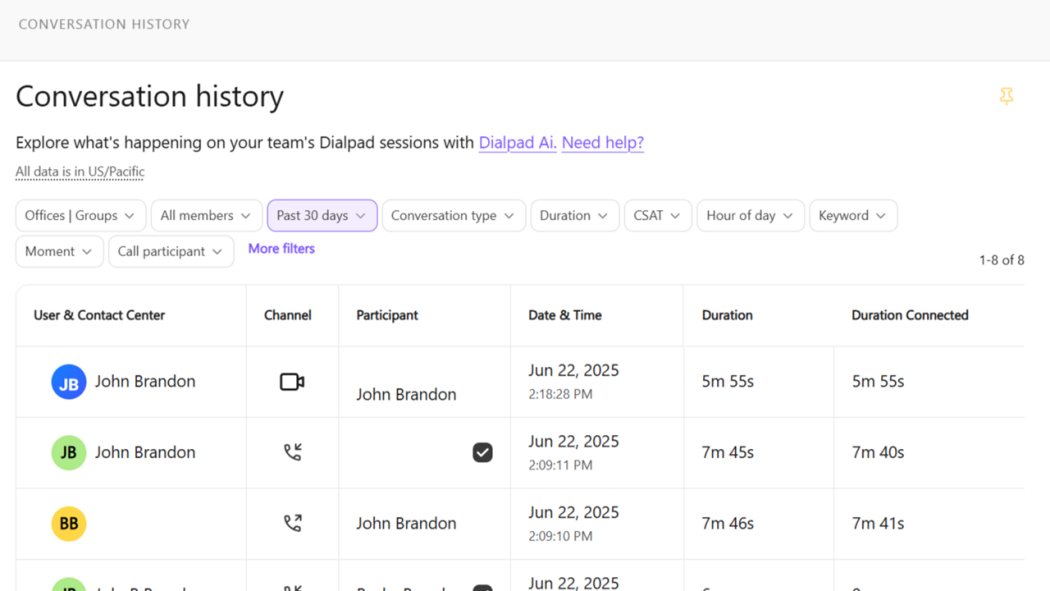
Dialpad is a cloud-based communications platform that combines calling, messaging, meetings, and contact center capabilities. Its core differentiator is an AI layer that includes real-time transcription, sentiment analysis, and autonomous AI agents that can execute workflows like refunds or rebookings across voice and digital channels.
The platform serves businesses of all sizes, from small teams to enterprises. It is positioned as a next-generation alternative to legacy contact centers, emphasizing AI-driven efficiency and scalability.
Key Features and Capabilities
Dialpad Review 2026: AI Contact Center Tested - Key Features and Capabilities.
AI-Powered Contact Center
Dialpad's contact center solution includes always-on AI agents that can handle routine inquiries autonomously. During calls, real-time coaching provides sentiment analysis and battle cards to assist agents. Post-call, AI generates summaries and action items.
Unified Communications
Beyond the contact center, Dialpad offers a full UCaaS stack: unlimited calling, SMS/MMS, team messaging, and video meetings. The interface is clean and modern, with a horizontal layout for calling, messaging, and meetings.
Integrations
Dialpad integrates with over 60 mainstream apps, including Google Workspace, HubSpot, Slack, and Zapier. Custom integrations are possible via API. However, the integration count is lower than some competitors like RingCentral.
Pricing Signals
Dialpad Review 2026: AI Contact Center Tested - Pricing Signals.
Dialpad's pricing is tiered, with annual billing discounts. Based on PCMag's review, the Standard plan starts at $15 per user per month (billed annually) and includes unlimited calling, SMS/MMS, and video conferencing for one person. The Pro plan is $25 per user per month and unlocks call queues, international SMS, and quality-of-service reports, but requires a minimum of three users. Enterprise pricing is custom and requires a 100-seat minimum.
For contact center features like call barging, monitoring, and whispering, you need Dialpad Support, which starts at $80 per user per month. This is a significant jump and may surprise buyers expecting these features in lower tiers.
Setup and Ease of Use
Dialpad Review 2026: AI Contact Center Tested - Setup and Ease of Use.
Setting up Dialpad is straightforward. The admin portal offers step-by-step guides, and adding users is simple: click "Add User," and Dialpad assigns a phone number. The interface is intuitive, though the separate Dialpad Meetings app for video conferencing on mobile is a minor inconvenience.
IVR setup is slightly complex, requiring workflow configuration, but it's manageable for those with basic technical knowledge. Support options vary by tier: all plans get 24/7 chat and web support, Pro adds phone support, and Enterprise includes a named customer success manager.
Strengths
- AI features: Call summaries, real-time transcription, and sentiment analysis are accurate and useful.
- Clean interface: Easy to navigate and configure.
- Reliable call quality: No distortion or lag in tests.
- Extensive analytics: Call quality reports include latency and packet loss data.
- Scalability: Suitable for small teams to large enterprises.
Limitations
- Seat minimums: Lower-tier plans impose minimum user counts, which can be restrictive for small teams.
- Feature gating: Call center features like monitoring and whispering require a costly upgrade to Dialpad Support.
- Separate meetings app: Video conferencing on mobile requires a separate app, which is less seamless.
- Integration count: Fewer integrations than some competitors.
- User complaints: Some users on Trustpilot and Reddit report price increases and support issues, though these are anecdotal.
Who Should Use Dialpad?
Dialpad is ideal for:
- Customer service teams that want AI-powered efficiency and real-time coaching.
- Outbound sales teams that need AI insights and automations to close more deals.
- Businesses seeking an all-in-one communications platform with strong AI capabilities.
- Enterprises that require scalability and advanced contact center features.
It may not be the best fit for very small teams due to seat minimums, or for those who need extensive integrations beyond the 60+ available.
Dialpad vs Competitors
When compared to RingCentral RingEX, Dialpad offers better AI features but fewer integrations. RingEX has hundreds of integrations and more cohesive video meeting functionality. Zoom Phone is more affordable but lacks advanced contact center features. Intermedia Unite provides a more complete set of calling features but doesn't match Dialpad's AI.
For a deeper comparison of customer service platforms, see our Intercom vs ProProfs Help Desk vs HelpCrunch analysis. If you're considering AI agents for social media, our automate social media customer service playbook is a useful resource.
Related reading
- Automate Social Media Customer Service: 2026 Playbook - Learn how to automate social media customer service with AI agents, chatbots, and routing rules. Includes workflows, metrics, and platform comparisons.
- Intercom vs ProProfs Help Desk vs HelpCrunch (2026) - Compare Intercom, ProProfs Help Desk, and HelpCrunch on AI agents, ticketing, channels, pricing, and fit — with clear guidance on which to choose.
- Intercom vs HappyFox: AI Helpdesk Compared (2026) - Intercom vs HappyFox compared: AI agents, channels, pricing models, and use cases. See which customer service platform fits your team in 2026.
Sources and further reading
- Has anybody here used Dialpad? : r/sysadmin - Reddit - Sep 19, 2023 ... Numerous issues though. Multiple price increases, dismissive account reps, poor support, poor documentation, and lack of any sort of meaningful ...
Frequently Asked Questions
Is Dialpad good for small businesses?
Dialpad can work for small businesses, but seat minimums on some plans may make it less cost-effective. The Standard plan supports one user, but Pro requires at least three.
Does Dialpad have a free plan?
No, Dialpad does not offer a free plan. It offers a free trial.
Can Dialpad handle high call volumes?
Yes, Dialpad's contact center solution is designed for high volumes, with AI agents and real-time coaching to support teams.
What integrations does Dialpad support?
Dialpad integrates with over 60 apps, including Google Workspace, HubSpot, Slack, and Zapier. Custom integrations are possible via API.
Is Dialpad's AI accurate?
In tests, Dialpad's AI call summaries and transcriptions were accurate. Sentiment analysis and advanced reporting require an upgrade to Dialpad Support.
Conclusion
Dialpad is a strong choice for businesses that prioritize AI in their communications and contact center operations. Its AI features are among the best in the market, and the platform is reliable and easy to use. However, seat minimums, feature gating, and a separate meetings app are drawbacks. For teams that need advanced contact center features, the cost can escalate quickly. Evaluate your needs against Dialpad's tiers and consider competitors if integrations or flexible pricing are critical.
For more reviews, see our Beam AI review and Fin review.