HelpCrunch Review: Honest Look at AI, Pricing & Limits
HelpCrunch Review: A Transparent Look at Its AI, Pricing, and Real-World Fit
Finding a customer communication platform that genuinely unifies your support, marketing, and sales efforts without a six-figure contract is tough. HelpCrunch enters that conversation as a cost-effective alternative to Intercom and Zendesk, bundling a shared inbox, AI chatbots, a knowledge base, email marketing, and popups into one subscription. But does its feature set hold up under real-world pressure, or are the most valuable tools locked behind paywalls? We spent time testing the platform, analyzing user reviews on Trustpilot, and comparing its AI capabilities against modern alternatives to give you an evidence-based, no-fluff assessment.
What Exactly Is HelpCrunch?
First viewport screenshot of The HelpCrunch blog.
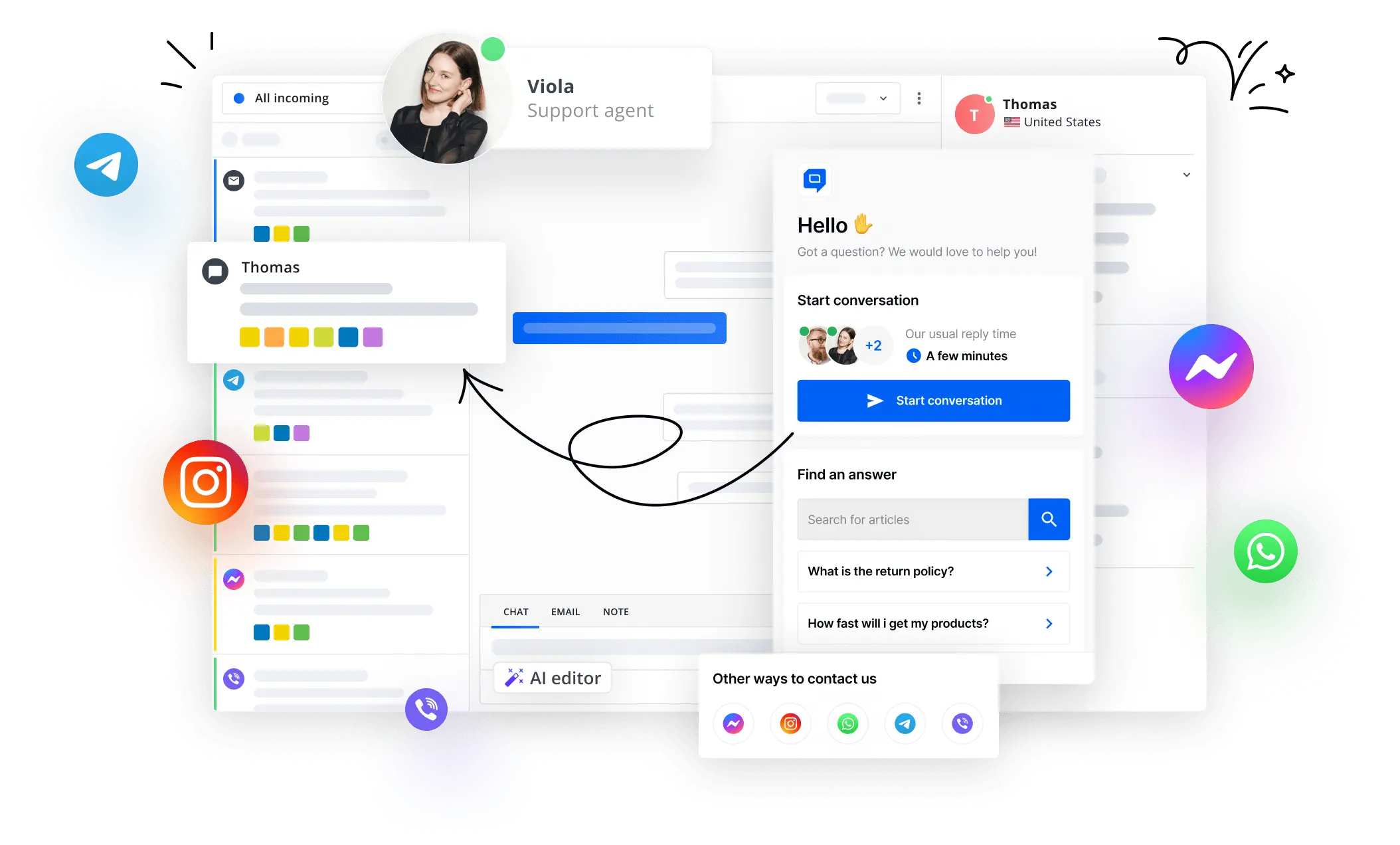
HelpCrunch is a customer communication platform designed to consolidate multiple channels into a single dashboard. Instead of paying for separate tools for live chat, email marketing, and a help center, you get all three inside one interface. The platform pulls messages from your website chat widget, email, WhatsApp, Instagram, and in-app messengers into a unified shared inbox. It also includes a WYSIWYG knowledge base builder, automated email campaigns, and popups for lead generation.
The company positions itself as a growth-friendly solution with no long-term contracts and free migration support. It is built for small to mid-sized businesses that want to move away from juggling a dozen apps or outgrowing basic live chat tools. The recent addition of AI Agents and an AI Editor signals an attempt to compete with more expensive, AI-first platforms, but as we will explore, the execution has important nuances.
Ideal Users and Core Use Cases
HelpCrunch Review: Honest Look at AI, Pricing & Limits - Ideal Users and Core Use Cases.
HelpCrunch is not a one-size-fits-all solution. Based on its feature gating and architecture, it fits best in specific scenarios.
Who Gets the Most Value?
- Small to medium SaaS companies that need a multichannel inbox and a self-service knowledge base without the Intercom price tag.
- E-commerce brands using chat and email marketing to recover carts, qualify leads, and provide order support from one place.
- Agencies or service businesses that want to embed a customizable chat widget on client sites and manage all conversations centrally.
- Teams transitioning from basic live chat tools who now need email marketing automation and a help center built into the same platform.
Primary Use Cases
- Unified customer support: Agents handle live chat, email, and social media messages in one shared inbox, reducing tab-switching and missed messages.
- Proactive lead generation: Targeted popups capture website visitors, and automated email sequences nurture them into customers.
- Self-service deflection: A searchable knowledge base integrated into the chat widget helps customers answer their own questions before contacting an agent.
- Basic AI automation: On higher-tier plans, rule-based chatbots qualify leads, route conversations, and suggest knowledge base articles.
Key Feature Breakdown
HelpCrunch Review: Honest Look at AI, Pricing & Limits - Key Feature Breakdown.
The Shared Inbox with AI Editor
The shared inbox is the operational core. It unifies live chat, email, WhatsApp, and Instagram messages, giving your team a single queue to work from. Collision detection prevents multiple agents from replying to the same customer simultaneously, and internal notes keep context visible.
Inside this inbox lives the AI Editor, an agent-assist tool that acts as a writing copilot. It can expand bullet-point notes into full, professional responses, correct grammar and spelling on the fly, adjust message tone from casual to formal, and translate messages into different languages. For support teams handling high volumes, this feature meaningfully reduces the cognitive load of crafting each reply from scratch. However, it is not a fully autonomous AI; it requires an agent to review and send the final message.
AI Agents and Chatbots: Automation with Boundaries
HelpCrunch's AI Agents are visual, no-code chatbots that you build using a drag-and-drop flow editor. You define the decision tree, set triggers, and train the bot on your knowledge base content. These bots can handle common tasks like qualifying leads, suggesting help articles, or routing chats to the correct department.
A critical distinction is that these are rule-based agents, not self-learning AI models. They follow the scripts you create and do not autonomously improve by analyzing past ticket resolutions. If a customer asks a question outside the predefined flow, the bot will likely hit a dead end and require human handoff. This is a deliberate design choice that offers predictability, but it falls short of modern AI teammates that learn from your entire ticket history and adapt responses contextually.
For a deeper comparison of helpdesk AI capabilities, see our breakdown of Intercom vs Chatwoot vs ClearFeed: Which Helpdesk Wins?.
Knowledge Base for Self-Service
HelpCrunch includes a full knowledge base builder with a WYSIWYG editor, SEO optimization settings, and multilingual support on higher plans. The knowledge base integrates directly into the chat widget, so customers can search articles before starting a conversation. This ticket deflection strategy works well when the content is comprehensive and well-organized.
The AI Editor is also available inside the knowledge base, helping your team write and translate articles faster. For businesses that want to reduce repetitive support questions, this is one of the most practical features in the platform.
Email Marketing and Popups
Beyond support, HelpCrunch includes lightweight email marketing automation. You can build email sequences, segment audiences based on chat interactions or custom properties, and track performance. The popup builder lets you create targeted on-site messages for lead capture, announcements, or special offers. While not a replacement for a dedicated marketing automation platform, these tools are sufficient for teams that want basic nurturing without adding another subscription.
Pricing Signals: What the Advertised Numbers Hide
HelpCrunch publishes three main plans, and the pricing structure reveals where the platform's true value sits.
| Feature | Basic ($15/user/mo) | Pro ($25/user/mo) | Unlimited ($620/mo) |
|---|---|---|---|
| Chatbot & AI Agents | Not included | 15 flows, 5 AI Agents | Unlimited flows & Agents |
| AI Conversations | Not included | 50 per month | 100 per month |
| AI Editor Requests | 20 per member/mo | 50 per member/mo | Unlimited |
| Knowledge Base | Monolingual | Multilingual | Multilingual |
| WhatsApp Channel | Not included | Included | Included |
| HelpCrunch Branding | Included | Removable | Removable |
| Team Members | Per user | Per user | Unlimited |
The headline $15 per user price is misleading if you need any automation. The Basic plan excludes chatbots, AI Agents, and the WhatsApp channel entirely. To unlock the AI features that differentiate HelpCrunch from simpler live chat tools, you must upgrade to the Pro plan at $25 per user per month. Even then, you are capped at 50 AI-handled conversations per month, which a moderately busy team can exhaust in days. Overage costs apply.
The Unlimited plan at $620 per month removes most caps and includes unlimited team members, making it suitable for larger teams that can justify the flat fee. But at that price point, you enter territory where you can evaluate more advanced platforms with self-learning AI and deeper integrations.
A 14-day free trial is available, and HelpCrunch does not lock you into annual contracts, which lowers the risk of trying it out.
Setup Experience and Migration
Getting started with HelpCrunch is straightforward. After creating an account, you install the chat widget via a JavaScript snippet or one of the platform's integrations with WordPress, Shopify, or other CMS platforms. The widget is customizable—you can adjust colors, positioning, and the greeting message to match your brand.
Setting up the knowledge base involves choosing a template, adding articles, and configuring your custom domain. The SEO settings are accessible and include meta titles, descriptions, and URL slugs. For email marketing, you connect your sending domain and build sequences using the drag-and-drop editor.
HelpCrunch offers free migration from other platforms, which includes transferring chat history, contacts, and knowledge base articles. This is a meaningful value-add if you are switching from Intercom, Zendesk, or another tool and want to avoid manual data export.
Where HelpCrunch Falls Short
AI Automation Is Gated and Capped
The most significant limitation is that core AI features are unavailable on the Basic plan and heavily capped on the Pro plan. If your primary reason for considering HelpCrunch is AI-powered automation, the real entry cost is $25 per user per month with strict usage limits. This makes it less accessible for small teams that need automation but cannot justify the per-user cost at scale.
Rule-Based Bots Lack Adaptability
HelpCrunch's AI Agents do not learn from past conversations. They operate on predefined flows, which means you must manually account for every possible customer query path. This works for simple, linear use cases but becomes brittle when customers ask unexpected questions. Modern AI support tools can ingest your historical ticket data, help center, and even Slack messages to generate contextual, accurate answers without manual flow-building.
Reported Reliability Concerns
User reviews on Trustpilot, where HelpCrunch holds a 4-star rating from over 30 reviews, mention occasional performance issues. Some users report chat widget loading delays and notification inconsistencies. While no platform has perfect uptime, these reports are worth considering if your business depends on real-time customer communication. The platform's overall sentiment is positive, but the feedback suggests the product is still maturing in certain areas.
Limited Workflow Depth for Larger Teams
HelpCrunch does not offer the advanced workflow automation, SLA management, or custom reporting that enterprise support teams often require. It is built for teams that need a unified communication hub, not a full-scale helpdesk with complex routing rules and multi-level escalation paths. If your team is scaling rapidly and needs deep workflow automation, you may want to explore platforms covered in our Top 10 Workflow Acceleration Platforms in 2026.
Decision Criteria: Is HelpCrunch Right for You?
Choose HelpCrunch if:
- You want to consolidate live chat, email, and social media messaging into one shared inbox.
- You need a built-in knowledge base and basic email marketing without paying for separate tools.
- You are a small to medium business looking for a more affordable Intercom alternative.
- You are comfortable with rule-based chatbots and do not require self-learning AI.
Look elsewhere if:
- You need AI that learns from your ticket history and adapts autonomously.
- You require deep workflow automation, SLA rules, or enterprise-grade reporting.
- Your team is large and the per-user pricing model would become cost-prohibitive.
- You need unlimited AI conversations without paying for the top-tier plan.
For teams evaluating how HelpCrunch stacks up against Intercom specifically, our guide on How to Use Intercom with Customer.io provides additional context on Intercom's integration capabilities and data model.
Sources and further reading
- Read Customer Service Reviews of helpcrunch.com - Do you agree with HelpCrunch's 4-star rating? Check out what 33 people have written so far, and share your own experience.
- An honest HelpCrunch AI review: Features, pricing, and limitations - Thinking about HelpCrunch? Our in-depth HelpCrunch AI review covers its features, pricing, and key limitations to help you decide if it's right for you.
- 10 Shared Inbox Software: The Simple, the AI-Powered & the All-in-One - When your support team is larger than one person, you inevitably face the question of effective collaboration. A customer service team is interacting with lots…
Frequently Asked Questions
Does HelpCrunch offer a free plan?
No. HelpCrunch does not have a permanent free plan. It offers a 14-day free trial that gives you access to all features, after which you must choose a paid plan.
Can I remove HelpCrunch branding from the chat widget?
Yes, but only on the Pro and Unlimited plans. The Basic plan includes HelpCrunch branding on the chat widget and knowledge base.
How does HelpCrunch's AI compare to Intercom's Fin AI?
HelpCrunch's AI Agents are rule-based and follow predefined flows, while Intercom's Fin AI is a large language model-powered agent that can understand context and answer questions without manual flow-building. HelpCrunch's approach offers more control but less flexibility.
Is HelpCrunch suitable for e-commerce businesses?
Yes. The combination of a customizable chat widget, email marketing automation, and popups makes it a solid fit for e-commerce brands that want to engage visitors, recover carts, and provide support from one platform.
What channels does the shared inbox support?
The shared inbox supports live chat, email, WhatsApp, and Instagram. WhatsApp is only available on the Pro and Unlimited plans.
Can I migrate my data from Intercom or Zendesk to HelpCrunch?
Yes. HelpCrunch offers free migration services that include transferring chat history, contacts, and knowledge base articles from other platforms.
Final Verdict
HelpCrunch delivers on its promise of being an all-in-one customer communication platform at a price point below Intercom and Zendesk. The shared inbox is genuinely useful, the knowledge base builder is solid, and the AI Editor provides practical agent assistance. For small to medium businesses that want to unify their support, marketing, and sales tools without a massive budget, it is a compelling option.
However, the AI automation story is more limited than the marketing suggests. The most valuable AI features are locked behind higher-tier plans with usage caps, and the chatbots are rule-based rather than self-learning. If you are buying HelpCrunch primarily for AI, understand that you are getting a visual flow builder, not an autonomous AI agent that improves over time. For teams that can work within those boundaries, HelpCrunch is a capable, cost-effective platform. For those who need adaptive AI and deep workflow automation, the search continues.