HelpDesk Review 2026: AI Ticketing Tested & Rated
HelpDesk Review 2026: AI Ticketing Tested & Rated
HelpDesk by Text positions itself as an AI-powered help desk that consolidates customer conversations from email, live chat, Messenger, and SMS into one smart inbox. The platform claims to handle 10x more support cases and deliver 60% quicker response times through automation. But does it live up to those numbers in everyday support operations? This review breaks down what HelpDesk actually offers, who benefits most, where it falls short, and how it compares with alternatives like Freshdesk, Zoho Desk, and Intercom.
What Is HelpDesk?
HelpDesk product interface.
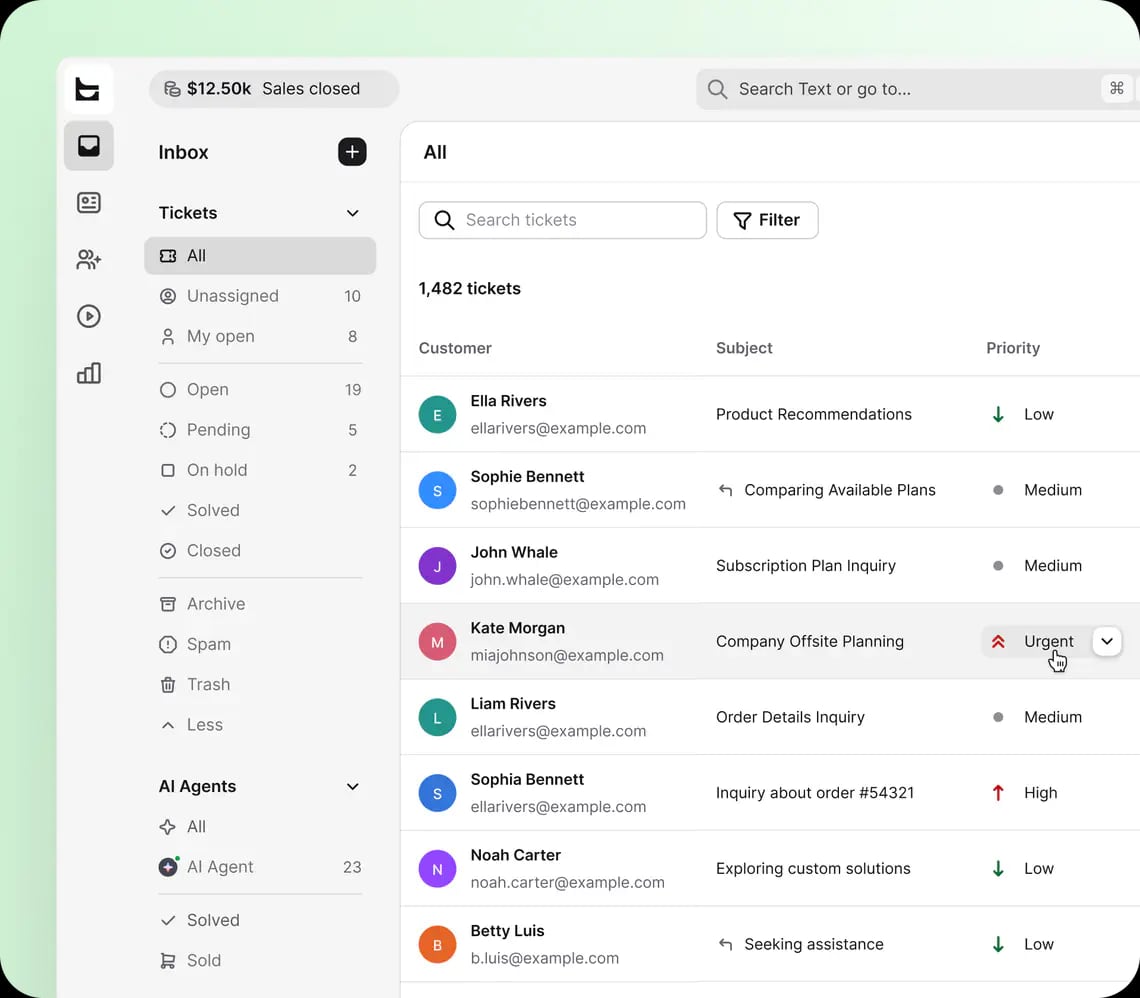
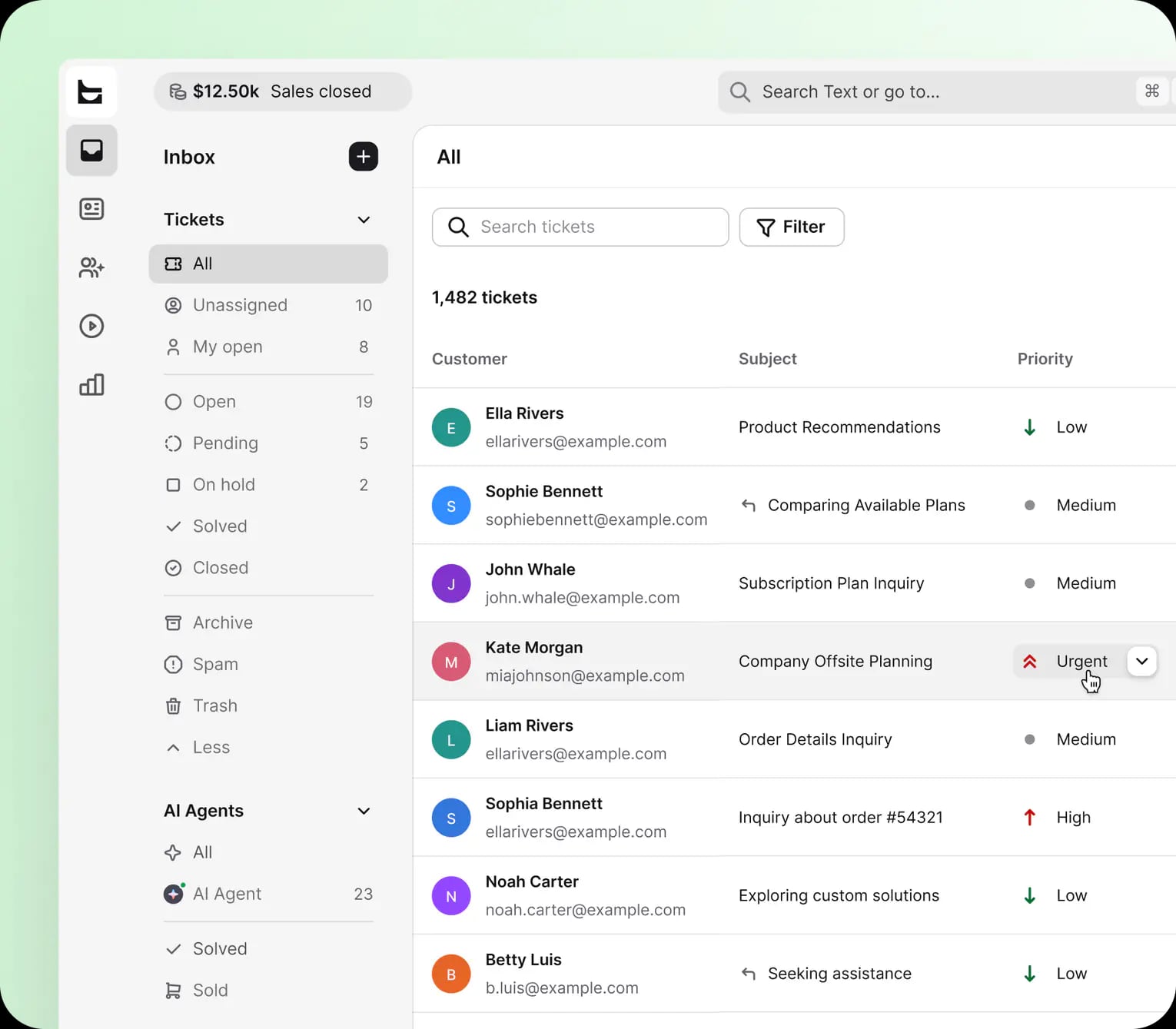
HelpDesk is a cloud-based ticketing and customer support platform built around a shared inbox model. Instead of forcing agents to switch between email, chat, and social tools, it pulls all incoming messages into a single queue. Each conversation becomes a ticket that can be assigned, prioritized, tagged, and tracked through resolution.
The product is aimed at businesses of all sizes, from small support teams to enterprise operations. Its strongest appeal is simplicity: teams can get a functional help desk running without the configuration overhead of larger ITSM suites. The vendor reports more than 35,000 brands use the platform, with SOC2 compliance and 24/7/365 support as part of the package.
Who Should Use HelpDesk?
HelpDesk product interface.
HelpDesk fits specific team profiles better than others. Here is where it makes the most sense.
Small and Mid-Sized Support Teams
Teams with 3 to 30 agents often need a tool that works immediately. HelpDesk's shared inbox reduces setup friction compared with enterprise platforms that require workflow design before the first ticket can be processed. If your team currently manages support through Gmail or Outlook, HelpDesk is a meaningful step up without a steep learning curve.
Ecommerce and SaaS Businesses
Native integrations with Shopify, WordPress, and Webflow make HelpDesk particularly relevant for online stores and product-led SaaS companies. Support agents can see order context alongside customer messages, which reduces back-and-forth and speeds up resolution for refunds, shipping questions, and account issues.
Teams Prioritizing Multichannel Consolidation
If your customers reach out through email, live chat, Messenger, and SMS, HelpDesk's unified inbox removes the need for separate tools. This is especially useful for small teams where one agent handles multiple channels and cannot afford to miss messages in disconnected tabs.
Core Features and How They Work
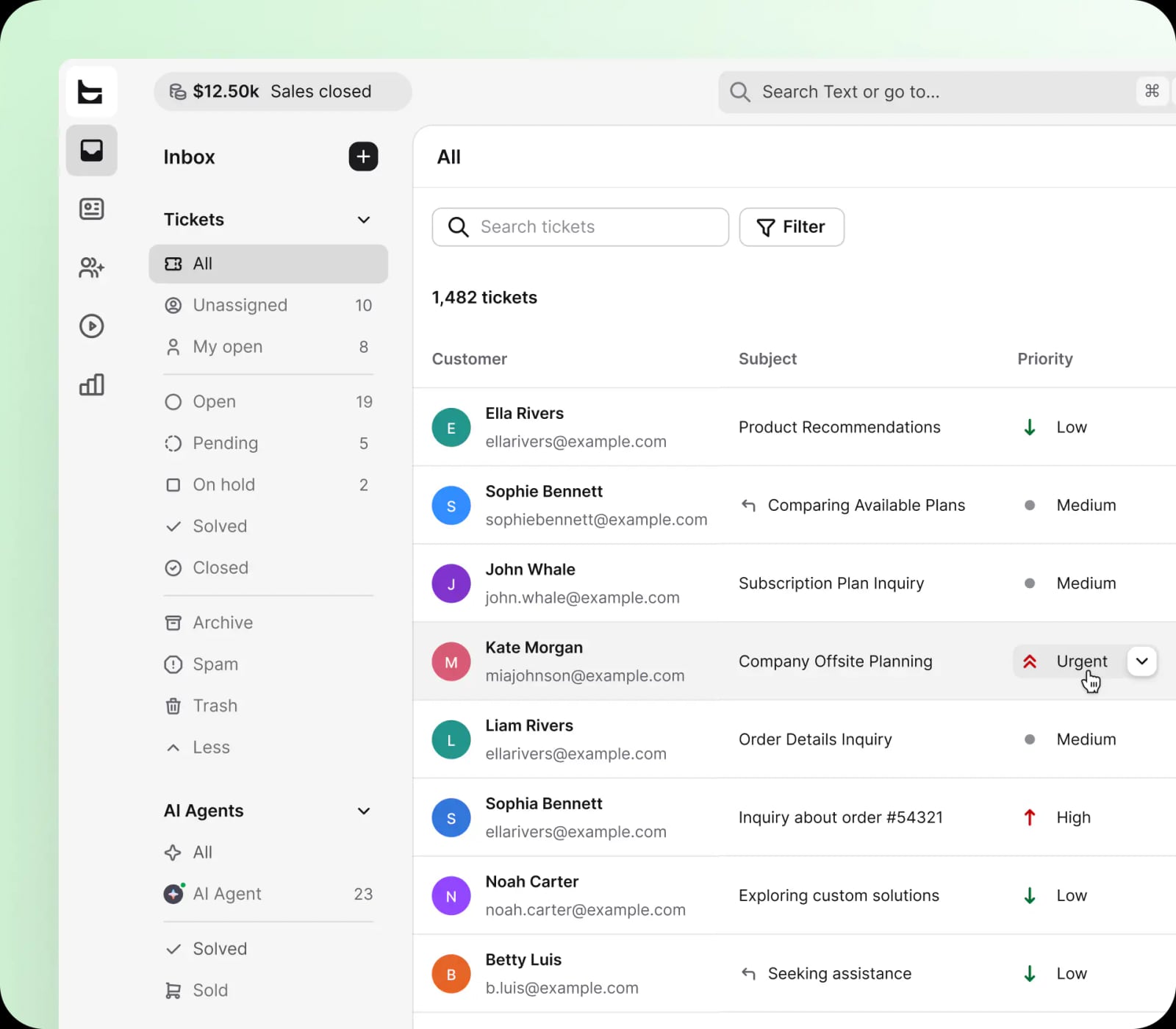
HelpDesk ticket inbox showing AI-assisted support with 1,482 tickets, priority filtering, and multichannel views.
AI-Empowered Ticketing
HelpDesk uses AI to automate parts of the ticket lifecycle. Suggested replies, automatic tagging, and intent detection help agents respond faster. The AI does not replace human agents entirely, but it reduces repetitive typing and helps categorize incoming requests before an agent opens them.
In practice, a customer email asking about a refund can be automatically tagged as "refund request," assigned to the billing team, and given a suggested response draft. The agent reviews and personalizes the draft before sending. This workflow is where the claimed 60% faster response time becomes plausible, though results depend heavily on ticket volume and team discipline.
Automation Rules
HelpDesk includes rule-based automation for ticket assignment, status changes, and notifications. You can create triggers such as "if the subject contains 'shipping,' assign to logistics group and set priority to high." These rules reduce manual triage and keep tickets moving when agents are busy.
Team Collaboration Tools
Internal notes, mentions, and shared ticket views let agents collaborate without forwarding emails or using a separate chat tool. A senior agent can leave a private note on a ticket, mention a colleague, and keep the customer-facing conversation clean.
Analytics and Reporting
HelpDesk provides dashboards for response time, resolution time, ticket volume, and customer satisfaction. The reports are simpler than what you would find in Zendesk or Freshdesk, but they cover the metrics most small teams actually track. Exportable reports are available for stakeholders who need weekly or monthly summaries.
Multichannel Support
Email, live chat, Messenger, and SMS all flow into the same inbox. This is a core strength for teams that want one place to manage every conversation. The trade-off is that some advanced channel features, such as social listening or phone support, are not part of the core offering.
Setup and Onboarding
Getting started with HelpDesk is relatively straightforward. The 14-day free trial requires no credit card, which lowers the barrier to testing. Setup typically involves:
- Connecting your email inbox or help desk address
- Adding team members and assigning roles
- Configuring basic automation rules
- Connecting integrations such as Shopify or WordPress if relevant
- Testing the ticket flow with a sample customer message
The interface is clean and uncluttered, which helps new users find core functions quickly. However, teams coming from a more complex platform may find the customization options limited. HelpDesk prioritizes speed of setup over deep configuration, which is a deliberate trade-off.
Pricing Signals
HelpDesk starts at $19 per user per month, which places it in the mid-range for help desk software. For comparison:
- Zoho Desk starts around $7 per user per month
- Freshdesk starts around $15 per user per month
- Zendesk for Customer Service starts around $19 per user per month
- Fin by Intercom starts around $29 per user per month
HelpDesk's entry price is competitive with Zendesk but higher than Zoho Desk and Freshdesk. The value depends on how much you use the AI features and multichannel consolidation. Teams that only need basic email ticketing may find cheaper options sufficient. Teams that want AI assistance and Shopify integration may find the price justified.
The free trial is a practical way to test whether the AI features deliver measurable time savings before committing.
Strengths and Limitations
Strengths
- Fast setup: The shared inbox model means most teams can start handling tickets within a day.
- Clean interface: Less visual clutter than enterprise help desk suites, which reduces training time.
- Practical AI features: Suggested replies and automatic tagging address real workflow pain points rather than adding gimmicks.
- Ecommerce integrations: Shopify, WordPress, and Webflow connections provide customer context that speeds up order-related support.
- Transparent trial: The 14-day no-credit-card trial makes evaluation low-risk.
Limitations
- Limited customization: Teams that need complex workflow branching, custom SLAs, or deep API access may find HelpDesk too rigid.
- No phone support channel: The multichannel claim covers email, chat, Messenger, and SMS, but not voice. Teams that handle phone support will need a separate tool.
- Reporting depth: Analytics cover the basics but lack the advanced segmentation and custom reporting available in Zendesk or Freshdesk.
- Pricing at scale: At $19 per user per month, costs add up for larger teams. Volume discounts may be available, but the public pricing is straightforward per-seat billing.
How HelpDesk Compares with Alternatives
HelpDesk product interface.
HelpDesk vs Freshdesk
Freshdesk offers a broader feature set, including phone support, more integrations, and deeper reporting. HelpDesk counters with a simpler interface and faster setup. If you need a full omnichannel contact center, Freshdesk is stronger. If you want a clean shared inbox with AI assistance, HelpDesk is easier to adopt.
HelpDesk vs Zoho Desk
Zoho Desk is significantly cheaper at the entry level and offers more customization. However, its interface can feel dated, and the setup is less intuitive for non-technical teams. HelpDesk wins on user experience; Zoho Desk wins on price and flexibility.
HelpDesk vs Intercom
Intercom is a broader customer communication platform with strong AI chatbot capabilities, but it costs more and can feel heavy for simple ticketing. HelpDesk focuses specifically on the help desk workflow. Teams that need marketing automation and product tours alongside support should look at Intercom. Teams that just need efficient ticketing should consider HelpDesk. For a deeper comparison of Intercom with other platforms, see this Intercom vs Featurebase vs CXone breakdown.
HelpDesk vs HubSpot Service Hub
HubSpot Service Hub combines help desk functionality with a full CRM, which is valuable if support and sales need shared customer context. HelpDesk is more focused and less expensive for pure support teams. If you already use HubSpot CRM, the Service Hub integration may outweigh HelpDesk's simplicity. For a detailed look at HubSpot's customer platform, read this HubSpot Customer Platform review.
Real-World Decision Criteria
When evaluating HelpDesk, ask these questions:
- Which channels do your customers actually use? If email and chat dominate, HelpDesk covers you well. If phone is a major channel, you will need a supplementary tool.
- How much customization do you need? Teams with simple workflows will thrive. Teams with complex routing rules or compliance requirements may hit limits.
- What is your budget per agent? At $19 per user per month, a 10-agent team pays $190 monthly. Compare that against the time savings the AI features actually produce.
- Do you sell through Shopify or WordPress? The native integrations are a genuine advantage for ecommerce support teams.
- How quickly do you need to go live? HelpDesk's fast setup is a real benefit for teams that cannot afford a multi-week implementation.
For teams exploring AI-first support workflows, this guide to using Gladly offers a useful comparison of another AI-centric approach to customer service.
Related reading
- Talkdesk Features: A Complete 2026 Breakdown - Explore Talkdesk features in 2026: routing, AI tools, reporting, integrations, and pricing. See where it excels, where it falls short, and how it compares.
- Intercom vs ProProfs Chat: Which Platform Wins in 2026? - Compare Intercom and ProProfs Chat on AI agents, live chat, pricing, scalability, and setup. See which customer support platform fits your team in 2026.
Sources and further reading
- Read Customer Service Reviews of helpdesk.com - Trustpilot - Contact info · 1 International Pl, Ste 1400, 02110-2619, Boston, United States · +1 (617) 275-2400 · support@helpdesk.com · helpdesk.com.
Frequently Asked Questions
Is HelpDesk good for small businesses?
Yes. The shared inbox model and fast setup make it a practical choice for small teams that need to move beyond email without adopting a complex enterprise platform. The $19 per user per month entry price is manageable for teams with 3 to 10 agents.
Does HelpDesk offer a free plan?
HelpDesk does not advertise a permanent free plan. It offers a 14-day free trial with no credit card required, which is enough time to test the core ticketing and AI features.
What channels does HelpDesk support?
HelpDesk consolidates email, live chat, Messenger, and SMS into one inbox. Phone support is not included in the core product.
How does HelpDesk use AI?
HelpDesk uses AI for suggested replies, automatic ticket tagging, intent detection, and workflow automation. These features aim to reduce manual work and speed up response times rather than replace human agents entirely.
Is HelpDesk secure?
The vendor states SOC2 compliance and provides 24/7/365 support. As with any customer data platform, teams should review the vendor's data processing terms and security documentation before deployment.
Can HelpDesk integrate with Shopify?
Yes. HelpDesk offers native integrations with Shopify, WordPress, and Webflow, which is particularly useful for ecommerce support teams that need order context inside tickets.
Final Verdict
HelpDesk is a focused, well-designed help desk tool that excels at consolidating customer conversations and applying practical AI to everyday support work. It is not the most customizable platform on the market, and teams with complex workflows or phone support needs will find gaps. But for small to mid-sized teams that want a clean shared inbox, useful automation, and ecommerce integrations without a lengthy implementation, HelpDesk is a strong contender.
The best way to evaluate it is to run the free trial with real customer messages. Measure how much time the AI suggestions and automation rules actually save your agents. If the efficiency gains justify $19 per user per month, HelpDesk is worth adopting. If you need deeper reporting, phone support, or enterprise-grade customization, explore alternatives like Freshdesk, Zendesk, or Zoho Desk before committing.
For more context on how HelpDesk fits into the broader help desk software landscape, see this evaluation of the best help desk software and PCMag's IT help desk software picks.